Running a Community Without It Running You
Most of a project’s community never writes a word, and most contributors send one pull request and leave. You don’t need six channels, a newsletter and a Discord to fix that. You need one place where answers stay findable, a second contribution that’s easier than the first, credit where people see it, and a plan for the day two people fall out.
Most of your community never says a word#
A community is everyone who depends on the project, not the people in the chat. Bootstrap, from September 28, 2025 to September 27, 2026:
| Step | People |
|---|---|
| Download it from npm | 6,970,246 downloads in the week of September 21, 2026 alone |
| Open an issue | 117 people, 184 issues |
| Get a pull request merged | 20 people, not counting bots |
| … of whom, exactly one | 16 |
| Merge the 531 pull requests | 2: Mark Otto and Julien Déramond |
Every project looks like this: a very wide top, a thin middle, and a few people at the bottom who do most of the work. Each step needs something different from you:
| Who | What they need from you |
|---|---|
| Users | Docs, and a place to ask that isn’t the issue tracker |
| Contributors | Issues ready to take, a quick first review, credit |
| Maintainers | Shared rights, a way to decide (governance), a way to step back |
| Advocates | Something to share: release notes, a post, a demo |
Don’t design the community for the few people who already do everything. Design it for the person who sends one pull request, so that the second one is easier.
Pick two channels, not six#
Six channels is how a community dies quietly. The Discord is where questions go to be forgotten, the mailing list is where two people argue, and the forum is where nobody posts because they don’t know if it’s still a thing. Pick one place for questions that must be findable next year, one for talking, and say so in the README.
Tailwind CSS says it in one line of its README: help, best practices and feature ideas go to GitHub Discussions. As of September 28, 2026, its Help category holds 6,619 questions, 2,453 of them marked as answered: each one is a search result the next person finds instead of asking again.
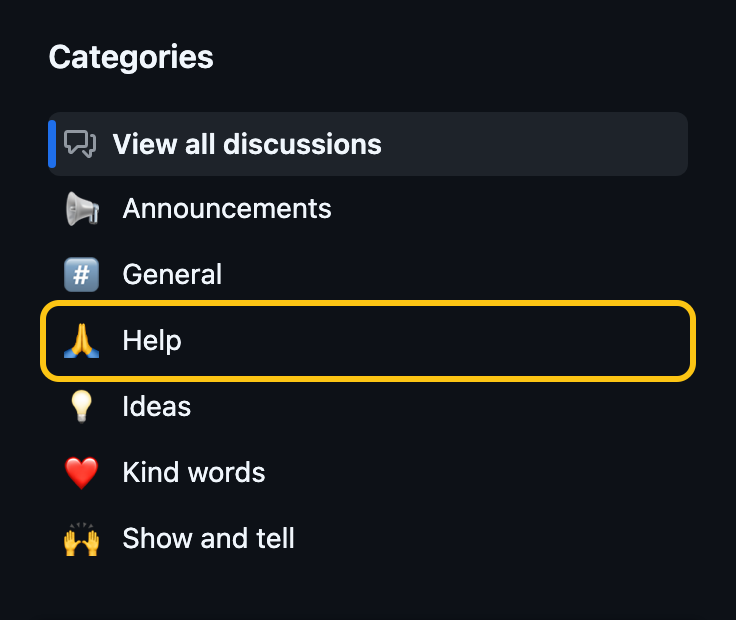
Six categories, and only Help is set to accept answers. The options, as of September 2026:
| Channel | Findable next year? | Readable without an account? | Cost for an open-source project |
|---|---|---|---|
| GitHub Discussions | Yes, by search engines and GitHub search. Answers can be marked | Yes | Free |
| Discourse | Yes | Yes | Free hosting for projects it accepts, or self-host |
| A mailing list | Yes, when the archive is public | Yes | Free on most hosts |
| Zulip | Inside Zulip: web-public channels can be searched, but not by search engines | Yes, for web-public channels | Cloud Standard is free for open-source projects |
| Matrix | Inside Matrix | Usually not | Free on public servers |
| Discord | No, unless a bot like Answer Overflow publishes the channels | No | Free |
| Slack | No: the free plan hides messages after 90 days and, since August 26, 2024, deletes them after a year | No | Free plan, or paid per member |
A chat is fine for talking, pairing and the thank-yous. It’s the wrong place for the answer to “how do I configure X”, because nobody will find it there next month. When a good answer happens in the chat, copy it to Discussions or to the docs.
Point people to the right place before they open an issue: the contact_links of .github/ISSUE_TEMPLATE/config.yml put your channels on the “New issue” page. The Files That Turn a Repository Into a Project has the file. And write in the README how long an answer usually takes: a volunteer project across time zones answers in days, not minutes, and saying so is kinder than silence.
Make the second contribution easier than the first#
The one-time contributor didn’t necessarily have a bad time. Most had one fix to make, and made it. Some would come back, if the way back were obvious:
- Keep a few good first issues ready. An issue deserves the good first issue label when someone new could fix it without asking you anything: the problem, the file to change, and what “done” looks like. Readers of Finding a Project to Contribute To look for it on your
/contributepage. Remove the label from issues nobody should start. - Review the first pull request fast. A reply in two days to a first-timer is worth more than a perfect review in two weeks. Reviewing Pull Requests covers what to say.
- Suggest the next step in the thank-you. “Merged, thanks! If you want another one, #1234 is in the same file.” That sentence is most of what a mentorship program does.
- Publish the list. This Week in Rust, 670 issues as of September 23, 2026, has a “Call for Participation” section every week: tasks from Rust projects, picked for people who “did not know where to start”.
What a new contributor needs to read before they start lives in CONTRIBUTING.md, not in a welcome message: see the files chapter.
Credit people where GitHub shows it#
A thank-you in a comment scrolls away. Credit that stays is credit people can link to, and GitHub displays three kinds of it for free:
- “New Contributors” in the release notes. GitHub’s generated release notes list who made their first contribution. Keep that section when you edit the notes by hand.
- The Contributors section of a release. Every user you
@mentionin the notes gets their avatar under the release (GitHub’s docs). Link the pull request and name its author, and the release shows everyone who made it. Co-authored-by:trailers on squashed commits, so everyone who wrote code, or shaped it in review, shows up as an author. Reviewing Pull Requests has the details and a tool that collects them.
Jest’s v30.5.2 release, on September 18, 2026, shows the first two, and the gap between them:
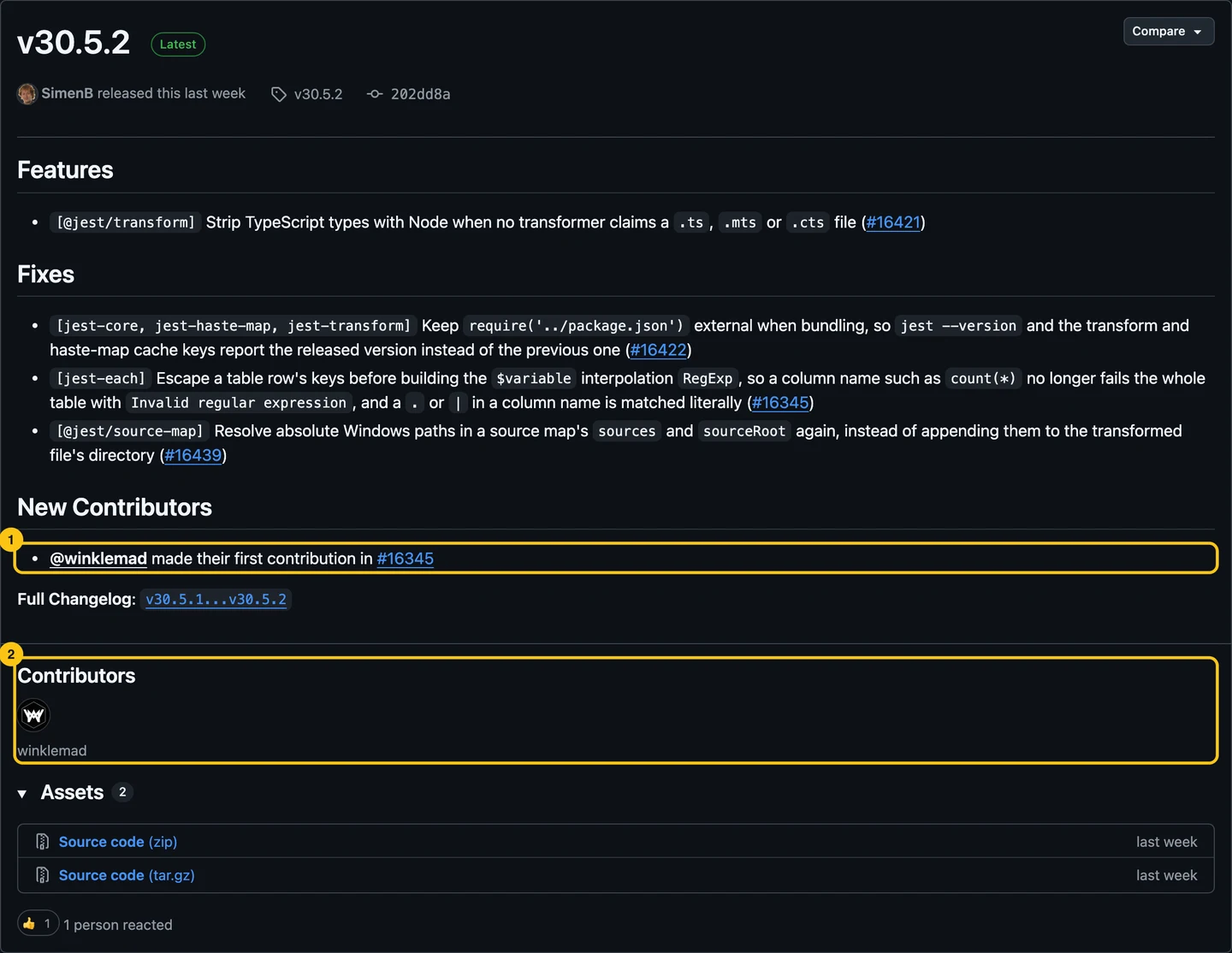
The notes welcome one new contributor (1), who is also the only avatar under Contributors (2): the other fixes link their pull requests without naming their authors, so the people behind them aren’t listed.
Credit for work that isn’t code needs one more step. The All Contributors bot adds people to a table in the README, with an emoji per kind of contribution, from a comment like @all-contributors please add @jane for doc. contrib.rocks turns a repository’s contributor list into one image to paste in the README.
A project can go further and build its own. Astro Badges gives every Astro contributor a page and a badge for their contributions, that they can put on their GitHub profile or website. Julien’s, for example:
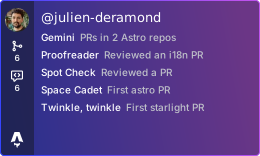
Chris Swithinbank shared the source code, for projects that want the same.
Keep a rhythm you’d keep in a bad month#
A newsletter that stops at issue three says the project stopped too. Pick the cadence you’d keep in your worst month, not your best one:
| Cadence | What | Example |
|---|---|---|
| Every release | Release notes that say what changed for the reader, with credits | GitHub Releases, generated then edited |
| Every month | A short “what happened”, even when not much did | Astro’s What’s new in Astro, every month from at least January 2024 to August 2026 |
| Every week | A newsletter, only with several editors | This Week in Rust, weekly, edited by eleven people as of September 2026 |
Release notes every release are the rhythm most projects can keep. They’re already a list of what changed and who did it. A monthly post is the next step; a weekly one takes a team.
An announcement goes where people already are: a pinned discussion in the Announcements category, the project’s accounts, and the chat. One post, three links.
Three kinds of conflict, three different exits#
Most conflicts in a project fall into three kinds, and each ends differently. Treating one as another is how a technical argument becomes a personal one.
| Kind | Looks like | Ends with |
|---|---|---|
| A technical disagreement | Two approaches, each with good arguments, in a pull request | A decision, by the process in your governance. Write it down, with the reason, and move on. |
| A personal clash | The same two people, on every thread | A private conversation with each of them, about the behavior, not the topic. Keep the technical decision separate. |
| A code of conduct breach | Insults, harassment, a pattern of hostility | Enforcement, in private, by the people named in the code of conduct. |
For breaches, the Contributor Covenant 3.0 gives an enforcement ladder: a private warning, then temporarily limited activities, then a temporary suspension, then a permanent ban. Most cases stop at the first step. Use the ladder even if you use another code of conduct: it makes the response proportionate and predictable, and people accept a rule they could read in advance better than a decision made on the spot.
GitHub gives you the tools for each step:
- Hide a comment, with a reason, instead of deleting it: the thread stays readable (managing disruptive comments).
- Lock a conversation that has stopped being useful. Saying No has the reply to post before you lock.
- Limit interactions on the repository for 24 hours up to 6 months, to existing users, prior contributors or collaborators only, when a link to your project lands somewhere big and the drive-by comments start (interaction limits).
- Block a user from the organization, for the top of the ladder (blocking a user).
Handle the case in private, and say in public only what the community needs to know: “this thread is locked”, not the details. And don’t moderate alone for long: a code of conduct needs a contact line more than one person reads.
Do this now#
- Write in the README where to ask questions and where to chat, and how long an answer usually takes.
- Turn on Discussions, or pick a forum, and add it to
contact_linksin the issue template config. - Label three issues as good first issue, each with the file to change and what “done” looks like.
- Name the authors in your next release notes, with an
@mention, and keep the New Contributors section. - Pick one cadence you can keep, and put the next date in your calendar.
- Check that your code of conduct names more than one person to contact, and that they know it.
Go further#
- Building Welcoming Communities, in GitHub’s Open Source Guides: the same ground, with more on making contributors feel welcome.
- The Art of Community by Jono Bacon: the book on community management for open source, free under a Creative Commons license.
- Contributor Covenant 3.0 enforcement guidelines: the four steps of the ladder, each with the event, the consequence and the repair.
- How to Create a Code of Conduct: picking the text, and who enforces it.