How to Write a Bug Report That Gets Fixed
A bug report gets fixed when a maintainer can see the bug fail on their own machine in a minute. That takes a link to a minimal reproduction, what you expected next to what happened, and the versions. Your theory about the cause is optional, and the word “urgent” never helps.
The examples come from Bootstrap, which Julien maintains, and Vite. Both close reports they can’t reproduce:
| Sept. 2025 to Sept. 2026 | Bootstrap | Vite |
|---|---|---|
| Issues opened | 184 | 689 |
| Closed as “not planned” | 70 | 89 |
| Labeled as missing a reproduction | 4 | 35 |
Bootstrap’s label is needs-example, and it closes issues labeled awaiting-reply after 14 days without an answer. Vite’s is needs reproduction, and it closes those after 3 days without activity: 21 of the 35 went that way (as of September 2026). “Not planned” also covers questions, duplicates and ideas the project turned down.
Search closed issues and try the latest version first#
The bug you hit has often been reported, and often fixed. Before you write:
- Search closed issues too. The issues tab filters on
is:openby default: remove it. Paste the error message in quotes. - Try the latest release, and the main branch if you can build it: Bootstrap’s
CONTRIBUTING.mdasks you to checkmain. If the bug is gone, you’re done. - If the issue exists, add what’s new. A reaction (👍) says “me too” without notifying anyone. Comment only with something that helps: another version, another browser, a smaller reproduction.
Questions aren’t bugs. “How do I…” goes where the project says, often GitHub Discussions or a chat: Bootstrap’s new issue page sends them to Discussions.
The reproduction is the report#
A maintainer’s first job with a report is to see the bug. If they can’t, nothing else in the report matters. Bootstrap’s template makes a reduced test case a required field, and labeling an issue needs-example posts this comment:
Bug reports must include a live demo of the issue. Per our contributing guidelines, please create a reduced test case on CodePen or StackBlitz and report back with your link, Bootstrap version, and specific browser and Operating System details.
Vite’s version adds a deadline: “Issues marked with needs reproduction will be closed if they have no activity within 3 days.”
Start from the project’s own starter, not from your app. Bootstrap links a CodePen template with Bootstrap loaded; vite.new opens a Vite project on StackBlitz. For a library with neither, a new repository with the smallest program that fails, and the command that shows it, does the same job.
Then reduce: remove code until the bug disappears, put back the last thing you removed, and stop. danneu did that for twbs/bootstrap#41578, starting from the spinner example in Bootstrap’s docs:
<div class="d-flex align-items-center">
	<strong>Loading...</strong>
	<div class="spinner-border ms-auto"></div>
</div>
One change, a label long enough to wrap, and the spinner turns into an ellipse. The report had both snippets, a screenshot and a CodePen. Three people answered with three fixes, and the one merged was mdo’s idea: flex-shrink: 0 on the spinner.
Another trick, from twbs/bootstrap#42007: show the same page without the library. The reporter added a screenshot of the date field without Bootstrap’s CSS, aligned, which proves the bug is Bootstrap’s and not the browser’s.
Expected, actual, and when it started#
BiggerNoise’s report for twbs/bootstrap#41379 fits on one screen. It says what should happen (1), what happens instead (2), since when (3), and links the demo (4):
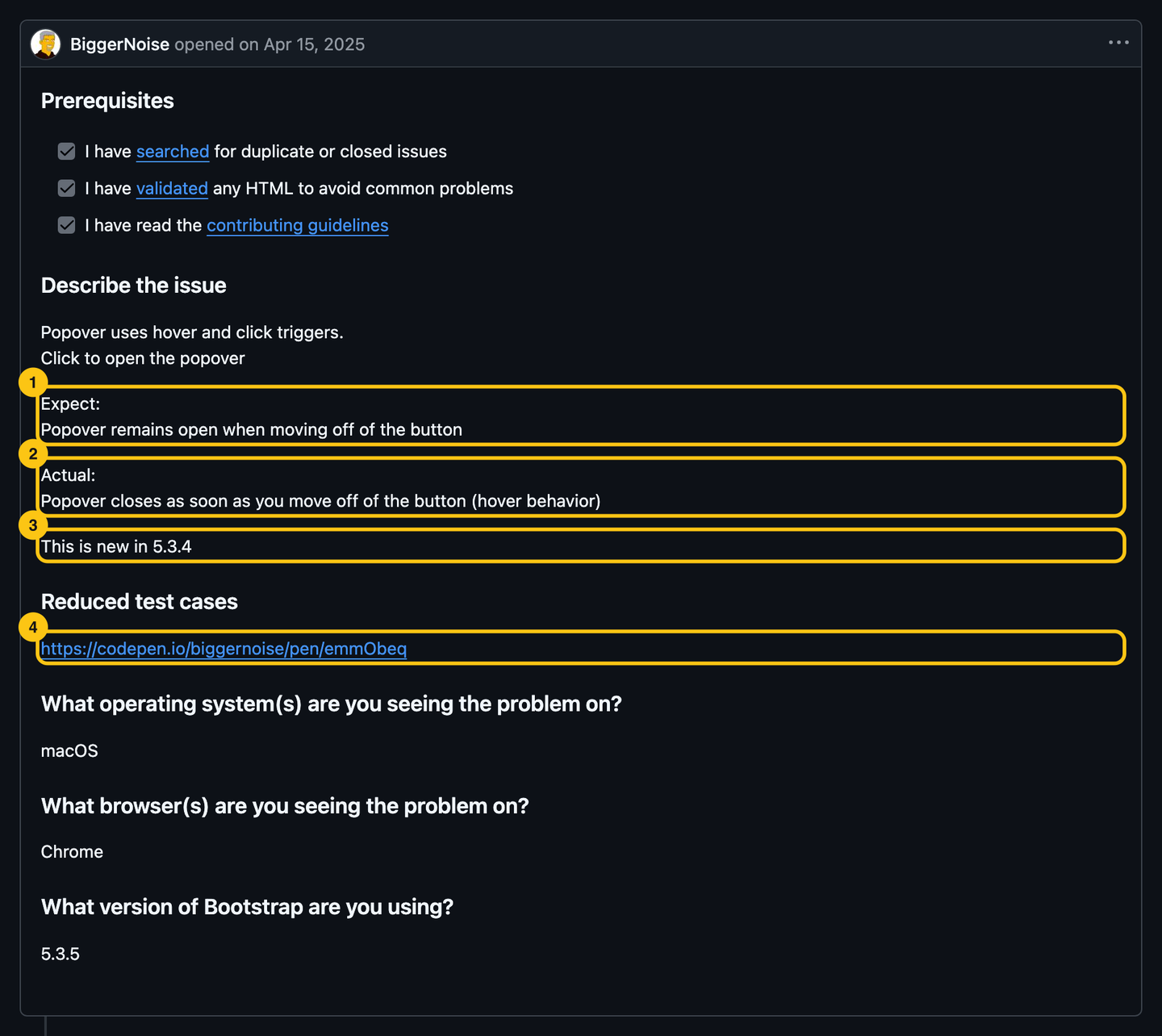
“This is new in 5.3.4” is the most useful line in the report. It turned “find the bug” into “compare two releases”. Julien answered the same day with the commit that caused it:
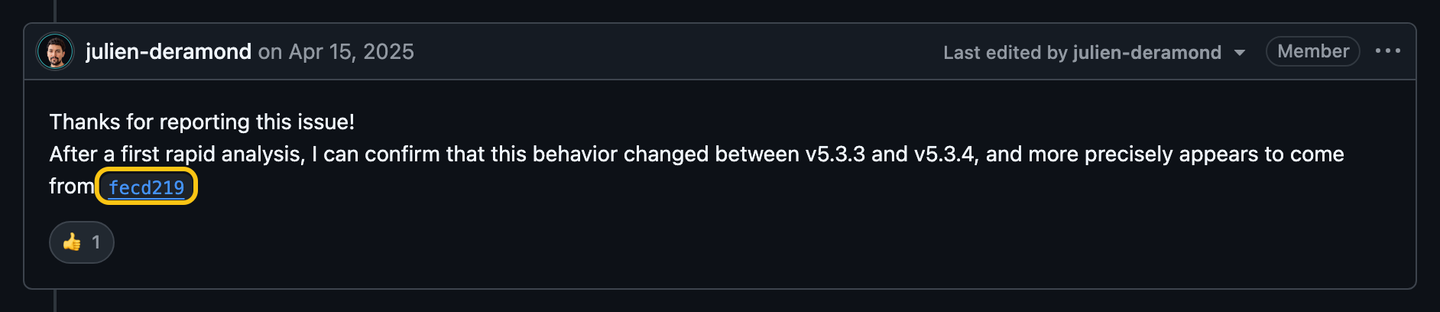
Another contributor opened the fix, merged seven weeks later. If you know the last version that worked, say it. If you don’t, installing two or three older versions to find out takes less time than waiting for someone to ask.
The versions go in too: the project’s, and whatever runs it (browser and OS for a CSS library, Node.js or Python for a tool). Your package manager gives the installed version, not the one your manifest asks for: npm ls <package>, pip show <package>, cargo tree -i <crate>. npx envinfo --system --browsers prints the rest in one block.
Keep your guesses for the end#
The title names the symptom: “Popovers always close when trigger is set to ‘hover click’”. Not your theory (“Event listener bug in popover.js”), not a mood (“Popovers are broken, please fix”). The maintainer will search for the symptom next month, when someone reports it again.
- Your guess about the cause goes last, under its own heading, labeled as a guess. If it’s right, it saves time. If it’s in the title, it sends everyone the wrong way.
- Paste text, not pictures of text. Error messages and logs as text can be searched and copied. Put a long log in a
<details>block so the report stays readable. - Screenshots and videos are for what you see: a layout, an animation, a focus that jumps.
- Leave out “urgent”, “production is down” and your company’s name. Nobody on the project owes you a deadline. If you need one, the project may sell support; the issue tracker doesn’t.
After you post, stay around#
The report isn’t done when you click Submit:
- Answer questions within a few days. The bots above don’t wait longer, and a maintainer who asked is looking at your issue now, not in a month.
- When someone links a fix, test it if you can, and say so. “Fixed for me with the branch from #41511” moves a pull request forward.
- If you find the cause was your own code, say what it was and close the issue yourself. The next person with the same symptom will find your answer.
If nobody answers for weeks, ask once, politely. The same rules apply to issues as to pull requests.
A feature request starts with your problem#
Bootstrap’s feature request template has two fields: Proposal and Motivation and context. The second one decides. “Add a size option to the tooltip” is a solution; “Tooltips cover the input they describe on small screens” is a problem, and the maintainers may know a better fix than yours.
- Say what you tried, and why it didn’t work: the workaround you’re using is evidence.
- Say who else needs it. Link the Stack Overflow question with 200 votes, not “a lot of people”.
- Offer to write it, if you can. A request with a volunteer attached gets a different answer.
- Be ready for “no”. Every feature is code someone maintains for years, and saying no to features is a big part of a maintainer’s job.
Some projects want ideas in Discussions first, and turn them into issues once they’re accepted. CONTRIBUTING.md says.
Security bugs never go in an issue#
A public issue about a vulnerability is a how-to for attackers until the fix ships. Look for a SECURITY.md, at the root or in .github/, and follow it:
- Bootstrap’s says to email security@getbootstrap.com with “SECURITY” in the subject, and aims to answer within three business days.
- Many projects, Bootstrap included, also turn on GitHub’s private vulnerability reporting: a Report a vulnerability button in the repository’s Security tab.
- If the project has neither, open an issue asking for a private contact, without any detail about the bug.
A template to copy#
Use the project’s template when it has one: it asks for what its maintainers need. When it doesn’t, this covers the rest:
<!-- Title: the symptom, e.g. "Popover closes on mouse leave when trigger is 'hover click'" -->

### What happens

Steps:

1.
2.

Expected:

Actual:

### Reproduction

<!-- A CodePen, StackBlitz or repository link, and the command that shows the bug -->

### Versions

- <project>: <version> (last version that worked: <version or "don't know">)
- OS, browser or runtime:

### Logs

<details>
<summary>Full error</summary>

<!-- paste the error as text -->

</details>

### Notes

<!-- Your guess about the cause, labeled as a guess. Workarounds you found. -->
Do this now#
- Search open and closed issues for the error message, in quotes.
- Reproduce the bug on the latest release.
- Build a reproduction from the project’s starter, and reduce it until removing anything makes the bug disappear.
- Write expected and actual, and the last version that worked if you know it.
- Add the versions of the project and of what runs it.
- Check the title names the symptom, then post, and look at the issue again in two days.
Go further#
- How to Report Bugs Effectively, by Simon Tatham: written in 1999, still the reference.
- Reduced test cases, on CSS-Tricks: the technique Bootstrap’s template links to, step by step.
- How to create a Minimal, Reproducible Example, from Stack Overflow: the same idea for code that isn’t in a browser.
- Your First Contribution, Step by Step: once the bug is confirmed, fix it yourself.