Reading a Repository in Five Minutes
Five minutes on a repository tell you whether someone is home: before you install the app, build on the library, or spend an afternoon on a pull request. Read the first page of commits, the health files, how the newest issues were answered, the oldest open pull requests and who writes the code. Stars measure attention, not maintenance.
The running example is withastro/starlight, a documentation theme. The screens are GitHub’s; GitLab and Codeberg show the same signals under other names.
Stars measure attention, not maintenance#
Stars go up when a project trends and never come down. They say nothing about whether anyone reads new issues. Two healthy projects:
| As of Sept. 2026 | Starlight | Prettier |
|---|---|---|
| Stars | 9.3k | 52.3k |
| PRs merged, 30 d | 47 | 121 |
| Open PRs | 21 | 283 |
| Open for 1 year + | 4 | 187 |
| Open issues | 8 | 1,154 |
Both are alive: Prettier merged 121 pull requests that month, 60 of them from people rather than bots. What differs is the queue. To use a project, read the merge rate: it says fixes ship. To contribute to one, read the queue: that’s where your pull request will wait.
The top of the page says if anyone is home#
The repository’s front page answers the first questions without a click: what the project is, where it lives, under which license and with which health files (2). The commit count (1) opens the history, the next stop.
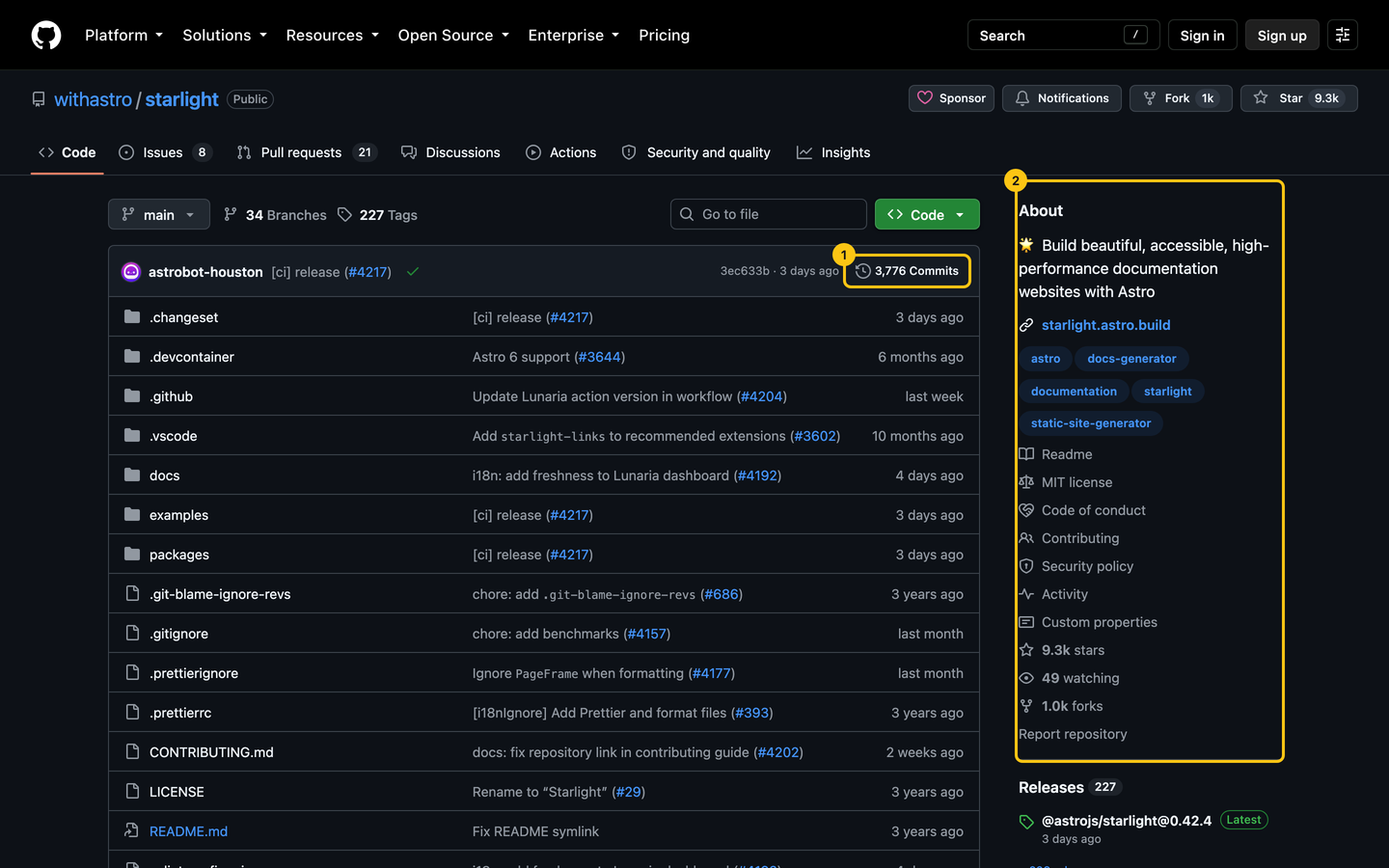
The About box, in order of what its absence means:
- No license: nobody may use, copy or modify the code, whatever the README says. No license means no permission.
- No description or website: the project isn’t trying to be found. Fine for a personal tool, a warning for something you’ll rely on.
- No “Contributing” or “Security policy” link: you’ll learn the rules in review, and a vulnerability report has nowhere private to go.
One page of commits shows the rhythm#
The latest commit is one data point: a typo fix yesterday says as little as a quiet month. Open the history with the commit count and read its first page, grouped by day.
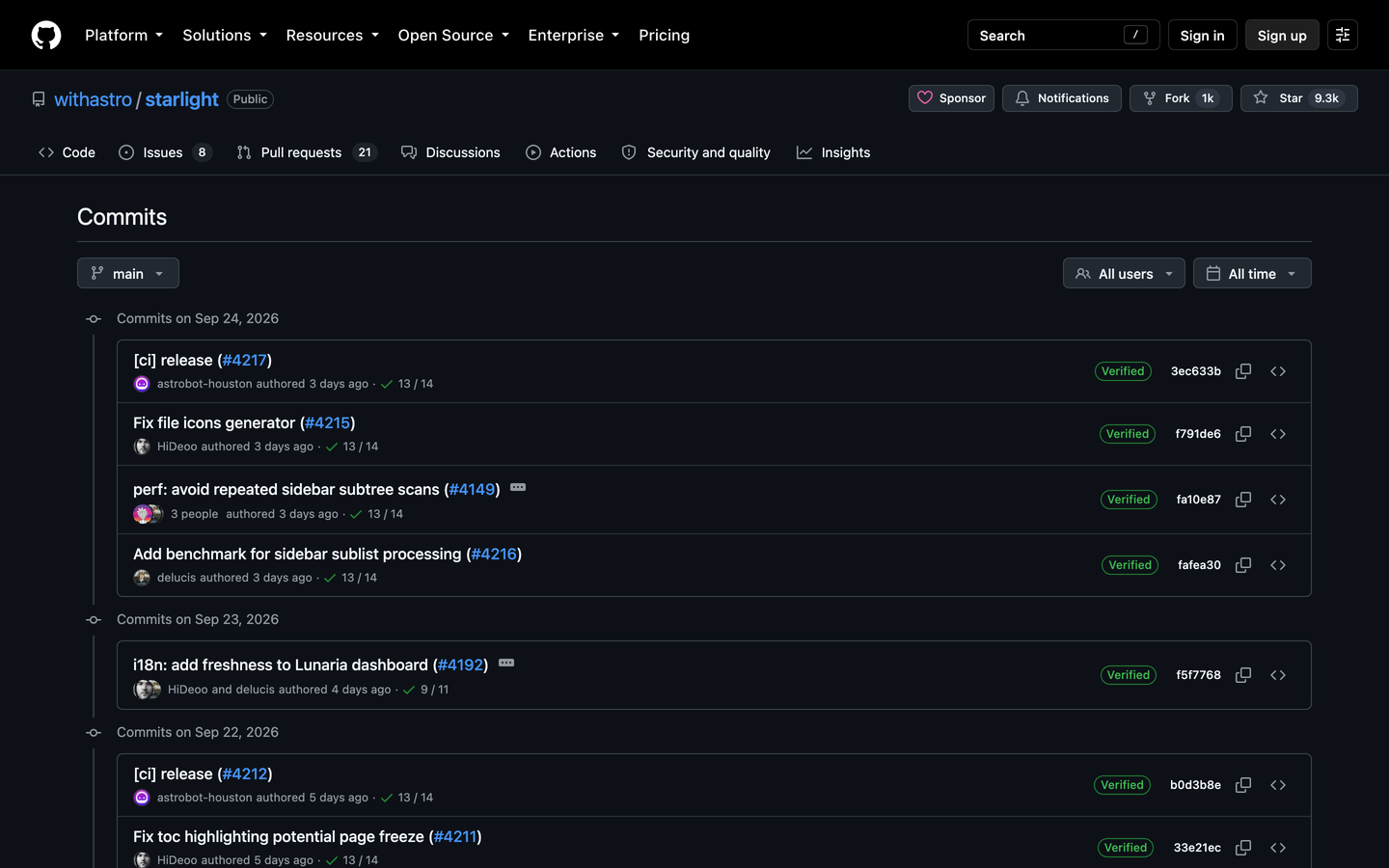
Three things to read on it:
- The span. Starlight’s first page covers September 2 to 24, 2026, with commits on 14 of those 23 days. A page that covers two years is a project that moves slowly: fine for a finished tool, a warning for one with open bugs.
- Who. 14 people and a release bot on that page. The same name on every line is the question the contributors graph answers, further down.
- What. Fixes and features, or only releases and dependency bumps. Starlight has 5 release commits out of 35. A page of bot bumps and nothing else is a project on autopilot.
The README answers three questions on the first screen#
Scroll to the README and give it one screen. It should tell you what the project does, how to try it, and where to ask or contribute. If you have to read the source to learn what the thing is for, the documentation you’ll need later won’t be better.
Health files show the project expects strangers#
GitHub scores every public repository against its recommended community standards. Add /community to the repository URL, or open Insights, then Community standards. Starlight ticks all eight lines.
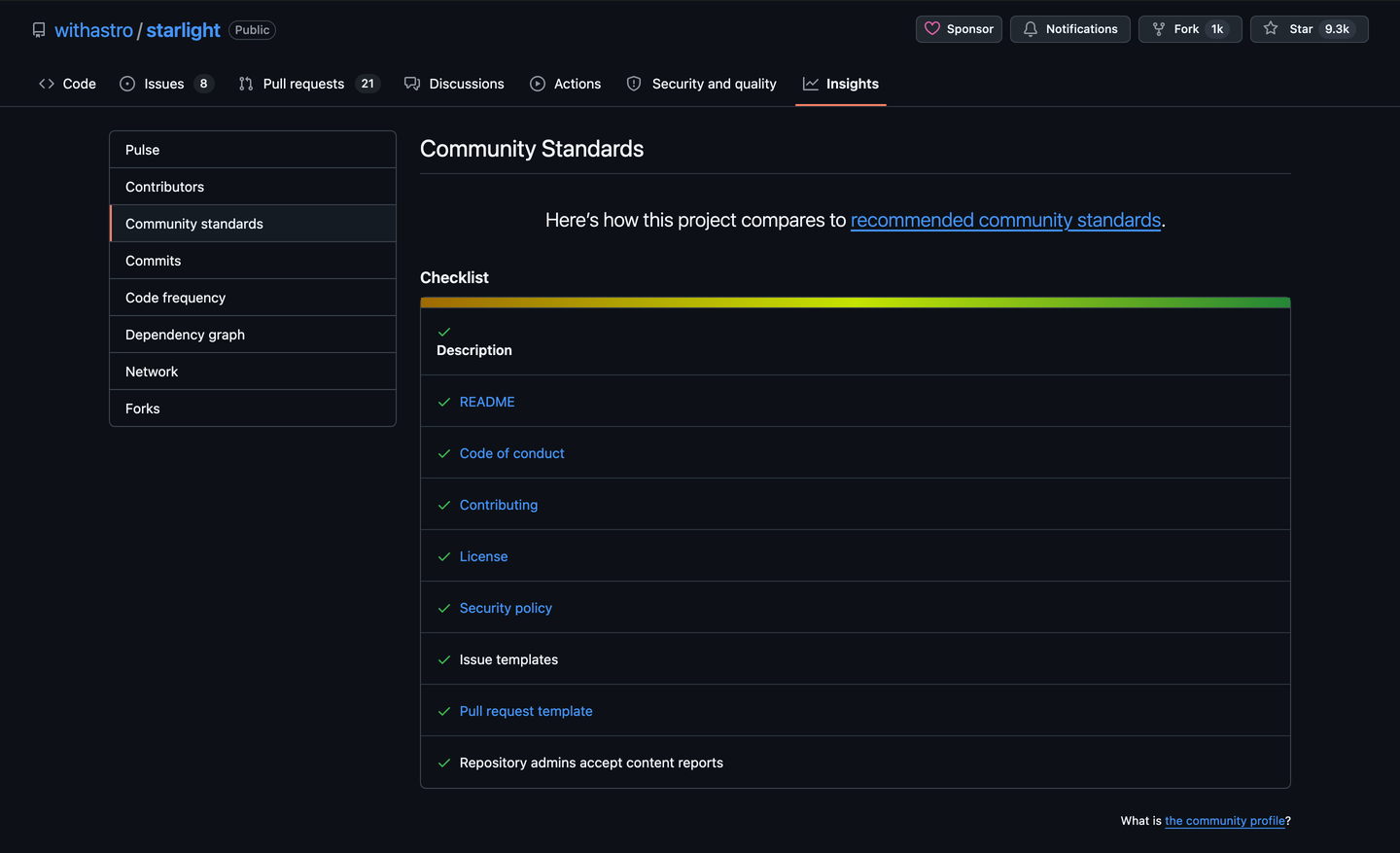
Missing files on a one-person side project are normal. On a project that asks for contributors, a missing contributing guide means the rules exist only in the maintainers’ heads.
The five newest issues are the project’s real policy#
The issue count says little: a popular project collects issues faster than anyone can close them. Open the five newest issues opened by people outside the team, and look at the first answer from someone with a Member, Collaborator or Owner badge.
On Starlight #4194, a bug report opened on September 11, 2026, a maintainer answered 2 hours 32 minutes later: thanks, an admission that the case wasn’t tested, the upstream fix to follow, and a version to stay on meanwhile.
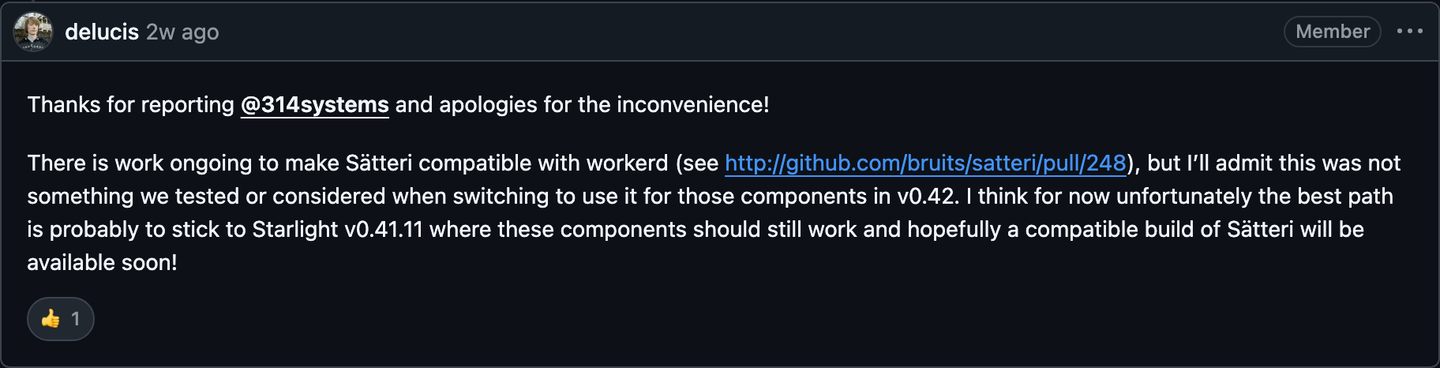
Of the four latest issues opened by outsiders, three got a maintainer’s comment within about 12 hours, the fourth a label within three days. What to look for:
- A human answer within a week, even a label or “can you share a reproduction?”.
- The tone. How maintainers answer a vague report is how they’ll review your pull request.
- Issues closed by a stale bot with no human comment: the project has stopped reading.
Sort pull requests by oldest#
The pull request list sorts newest first, which hides the answer you want. Sort by oldest (2), or use this search:
is:pr is:open sort:created-asc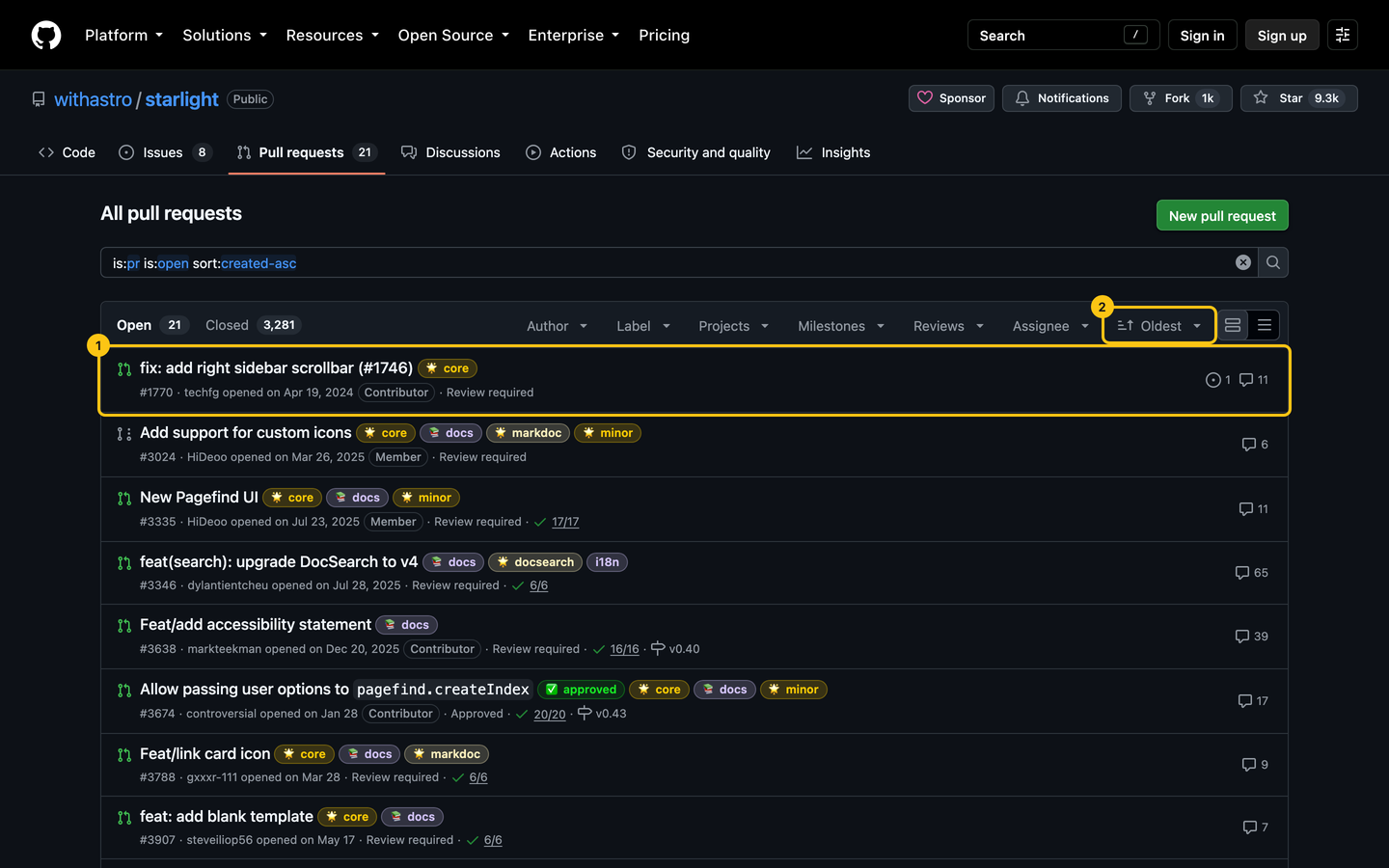
Starlight’s oldest open pull request dates from April 2024 (1), and only four are more than a year old. Look at why the old ones wait. “Changes requested” means the ball is with the author. “Review required” for a year means nobody decided, and yours may join them.
Dependency bots tell you the same thing faster. Search for is:pr is:open author:app/dependabot (or app/renovate): a pile of bumps nobody merged means nobody is watching the dependencies either.
Count the people, not the commits#
Open Insights, then Contributors. The graph shows commits per week to the default branch, then one card per person.
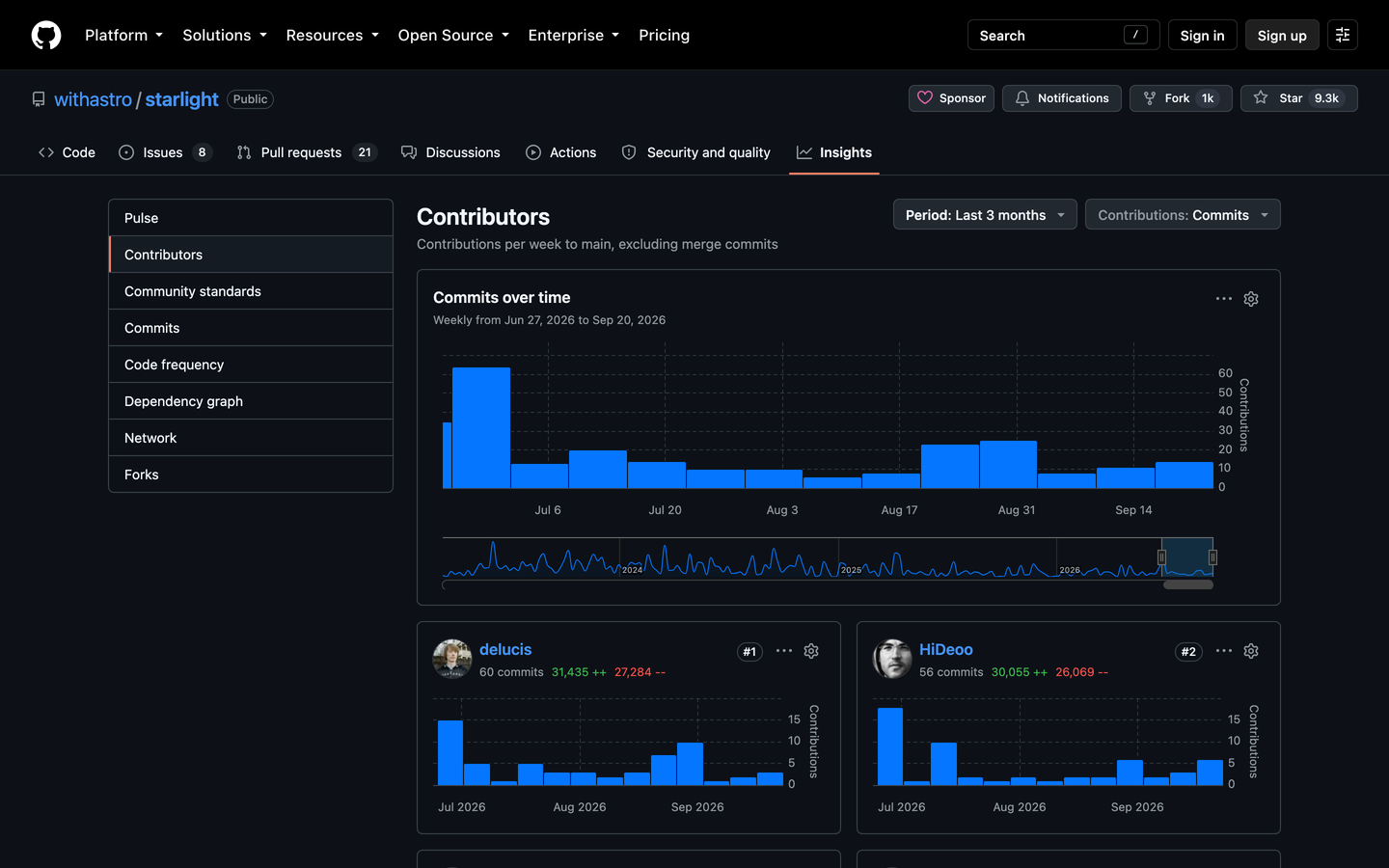
Starlight had 40 people commit to its main branch over three months, bots excluded, and nobody wrote more than a sixth of the 178 commits (as of September 2026). When one person writes nearly everything, the project’s future is that person’s free time. It’s not a reason to stay away, but it’s the first thing to check before you rely on it, as an app or as a library.
Let a tool do the counting#
For a second opinion, or a repository too big to eyeball:
- OSS Insight charts stars, issues, pull requests and response times over years. Replace the owner and repository in the URL.
- Ecosyste.ms lists a repository’s maintainers, activity, dependents and packages across registries.
Both read the same data as your five minutes. They help when you’re comparing several projects, not as a replacement for reading one issue thread.
Do this now#
Pick a project you use or want to contribute to, and run through the list. Green on most lines is a workshop. Red on the queue and the answers is a museum: fine to read, slow to contribute to.
- The first page of commits spans weeks or months, not years, and has people on it, not only bots.
- The repository has a license, a description and a contributing guide.
- The README says what the project does, how to try it and where to ask, on the first screen.
- Community standards (
/community) shows the files a contributor needs: contributing guide, code of conduct, security policy, templates. - Of the five newest issues from outsiders, most got a human answer within a week.
- The answers are specific and polite, even to vague reports.
- Sorted by oldest, few open pull requests are more than a year old.
- Dependency bot pull requests get merged, not piled up.
- At least two people commit regularly.
- The latest release, if the project publishes releases, is less than six months old.
Go further#
- About community profiles for public repositories: what GitHub’s checklist checks, from the maintainer’s side.
- CHAOSS metrics: the research community that defines project health metrics, for when five minutes isn’t enough.
- Finding Open-Source Software to Use: where to look for an app, a tool or a library, and what to check before you adopt it.
- Finding a Project to Contribute To: once a repository passes this check, how to find the issue to start with.