Non-Code Contributions Maintainers Actually Want
“You don’t have to write code to contribute” is true, and not much help on its own. Here are eight kinds of contribution, a first task for each that takes under an hour, and a real one that got merged, answered or shipped. Most of them need no pull request, and triage is the one maintainers are shortest of.
| Contribution | A first task, under an hour | Where to find it |
|---|---|---|
| Documentation | Fix the sentence that confused you | The page you just read |
| Triage | Reproduce an open bug report and comment with what you found | Newest issues without a label or an answer |
| Translation | Translate one page into your language | The project’s Weblate or Crowdin page, or its i18n folder |
| Accessibility | Tab through a page, or turn on your OS’s contrast mode, and report | The project’s own docs site |
| Testing | Install the beta and run your project on it | npm install <package>@beta, pip install --pre <package>, or the release notes |
| Answers | Answer one question in Discussions | Unanswered discussions, newest first |
| Writing | Write the tutorial you wished existed | Your blog, then the project’s newsletter or list |
| Money | Sponsor a project you use | The Sponsor button on its repository |
Fix the sentence that confused you#
You’re the best reviewer of a docs page in the minute after it confused you. The maintainers wrote it knowing the answer; you read it without. Fix that one sentence, and say in the pull request what you misread.
Rawal27 did that on MDN’s page about equality in JavaScript, where NaN was called an object (1). It’s a value (2):
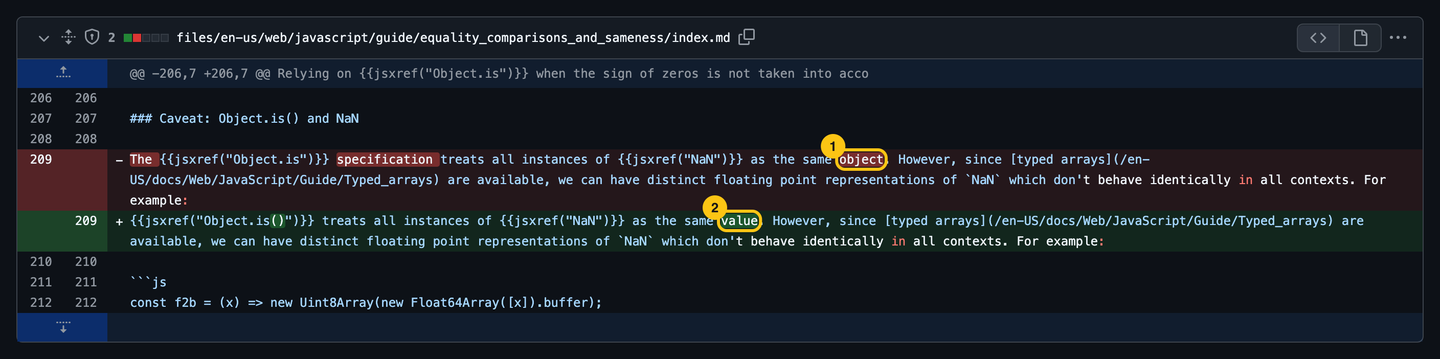
mdn/content#45853 changed one line and explained why in the description. It was merged 20 hours after it was opened. Most docs sites have an Edit this page link at the bottom: it opens the file on GitHub, and Git and GitHub Basics covers the rest.
Reproduce someone else’s bug#
Triage is reading new issues and doing the first step a maintainer would: try to reproduce the bug, and say what happened. It needs no write access and no code, and it’s the help maintainers get least of: a busy project gets more reports than it has people to check them.
CyrilKrylatov isn’t on the Bootstrap team. They’ve commented on 27 Bootstrap issues and opened no pull request (as of September 2026). On twbs/bootstrap#41883, an accordion that opened two items when clicked fast, their first comment said they couldn’t reproduce. They kept trying, struck that out, and replaced it with “Reproduced on Firefox 146.0b5 (aarch64)” and a 22-second screen recording. On #42242, they checked Firefox and Chrome, found nothing, and asked whether the reporter’s own CodePen showed the bug. It didn’t: the bug came from the reporter’s app, not Bootstrap, and the issue closed on their word, without a maintainer spending an hour on it.
- Start with the newest issues that have no label and no answer. They’re the ones nobody has looked at. CodeTriage emails you one open issue a day from the repositories you pick.
- Say what you tried, even when it fails: version, browser or OS, and the steps. “Can’t reproduce on 5.3.8, Chrome 141, macOS” narrows the search too.
- Don’t close, label or promise anything. That’s the maintainers’ call. Once they know your name, some projects give you the Triage role, which can label and close issues.
How to Write a Bug Report That Gets Fixed is the same work from the other side: what a reproduction needs to contain.
Translate what people read first#
A project’s docs in your language reach people its English docs don’t. Start with what everyone reads: the README, the getting started page, the code of conduct.
The Contributor Covenant, the code of conduct most open-source projects use, is a good first one. Version 3.0 exists in 9 languages, version 2.1 in 25 (as of September 2026). stacyharper’s French translation of 3.0 was one file, and was merged the day it was opened.
- Projects that translate a lot use a platform instead of pull requests: Hosted Weblate hosts open-source projects for free, and you translate string by string in the browser.
- Translate the meaning, not the words, and keep the project’s terms as they are: a class name or a command stays in English.
- Ask before you start a new language: someone has to keep it up to date, and the maintainers may not want a translation nobody will update.
Report what you can’t use#
Accessibility bugs are found by using the site the way some people have to: with a keyboard only, with a screen reader, with the OS’s high-contrast mode. You don’t need to be an expert to report what you see.
A Bootstrap user browsing with Windows’ forced-colors mode found that buttons lost their focus ring: the ring was a box-shadow, and forced-colors mode removes shadows. The report, twbs/bootstrap#42062, had screenshots of both states, the CSS responsible, and a workaround. Bootstrap 6 uses outline instead, and the issue was closed as fixed a month later.
- Tab through the project’s docs site: can you see where the focus is, and reach every control?
- Turn on your OS’s contrast or forced-colors mode, and zoom to 200%.
- Run axe DevTools or Lighthouse’s accessibility audit, and report the issues you can explain, with the element and the rule.
Design works the same way: an issue with a screenshot of what’s wrong and a mock-up of the fix gets further than a new logo nobody asked for.
Try the next version before it ships#
A bug found in a beta is fixed before anyone depends on it. Many packages publish betas and release candidates next to the stable version, and the release notes ask for feedback. Your package manager skips them unless you ask: npm install vite@beta gives you Vite’s, pip install --pre <package> the latest pre-release of a Python package.
pricop was reading the docs of Bootstrap 6, still in development, and noticed every component looked small. The base font size had moved from 1rem to 14px. Their issue, twbs/bootstrap#42061, explained what it broke for users who set a larger default font size in their browser. A month later, #42119, “v6: Restore 16px base font-size”, was merged.
- Install the beta in a branch of a real project of yours, run your tests and click around. Your project is a test case the maintainers don’t have.
- Report regressions with the last version that worked: “works on 8.3.1, breaks on 8.3.0-beta.1”.
- Found a bug and know which line? A failing test that shows it is a contribution on its own.
Answer the question you can answer#
Discussions and chats fill up with questions the maintainers answer on evenings. Every question you answer is one they don’t have to.
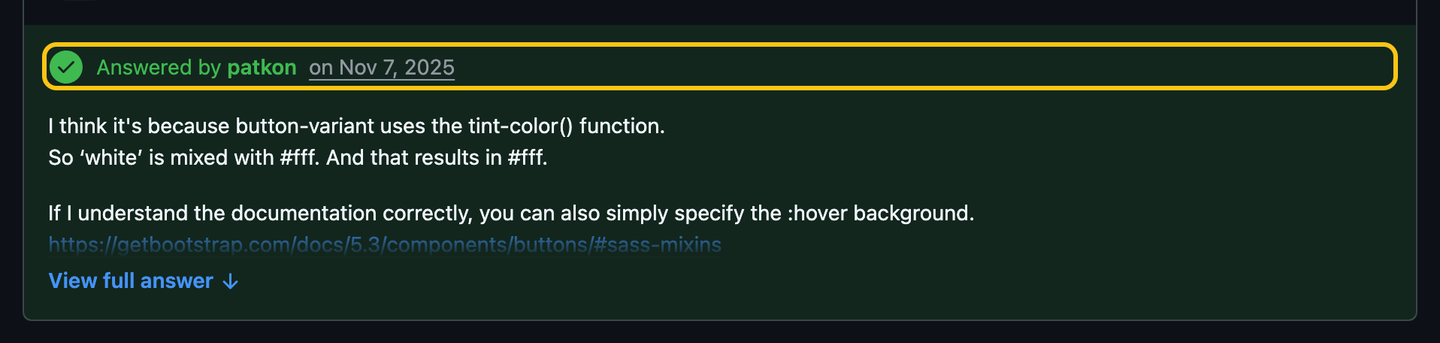
On Bootstrap, 39 of the last 100 answered discussions were answered by people outside the team (May 2024 to September 2026). patkon answered this one, a Sass mixin that didn’t darken white buttons on hover, the day it was asked:
- Answer with a link to the docs page when there is one. If there isn’t, that’s a docs contribution waiting.
- Say “I think” when you’re not sure. patkon did, and was right.
- Welcome first-timers. A thank-you on someone’s first pull request, from anyone, makes the second one more likely.
Write the tutorial you wished existed#
The blog post or the video you make after a day of figuring something out is the one the next person searches for. Projects and their communities link them.
This Week in Rust is a newsletter the Rust community has published every week since 2013. Anyone can suggest a post with a pull request that adds one line: in issue 670, benw’s video lesson on fixing borrowing errors went in that way. Many ecosystems have their equivalent, and “awesome” lists take pull requests too.
Talks work the same: a ten-minute talk at a local meetup about how you used a project is how a lot of people hear of it. Promoting covers the maintainer’s side.
Money is a contribution too#
A monthly sponsorship pays for a maintainer’s time, the one thing none of the above can. Look for the Sponsor button at the top of a repository: it comes from the repository’s .github/FUNDING.yml, whatever the language. Some package managers also list the funding links of everything you install: npm fund for JavaScript, composer fund for PHP.
- A few dollars a month from you, and a real amount from your company if it uses the project. Understanding Funding Models covers where the money goes.
- One-time donations help too, on Open Collective or GitHub Sponsors.
Ask for credit, and give it#
Most of this work is invisible. A repository’s contributor list and your GitHub profile count commits, so triage, answers and testing don’t show. Ways around it, from the maintainer’s side and yours:
- The all-contributors spec credits 33 kinds of contribution in the README, from 🐛 bug reports to 💬 answering questions. Some projects run its bot: a comment adds you to the table.
Co-authored-by:trailers in a commit credit everyone who worked on it on GitHub, not only the author (GitHub’s docs). If your reproduction or your review shaped a fix, ask to be added.- Keep your own list: links to the issues you triaged, the questions you answered, the talk you gave. That’s the portfolio a contributor graph doesn’t show.
Do this now#
- Next time a docs page confuses you, fix the sentence before you close the tab.
- Open the issues of a project you use, sorted by newest, and try to reproduce one report.
- Tab through that project’s docs site with the keyboard only.
- Answer one unanswered question in its Discussions or chat.
- Check whether it has a Sponsor button, and whether your company uses it.
Go further#
- How to Write a Bug Report That Gets Fixed: what a good reproduction contains, useful for triage too.
- Your First Contribution, Step by Step: when your docs fix turns into a pull request.
- Contributor Covenant translations: how to start one, from the project’s contributing guide.
- How to Create a Code of Conduct: the article where we first suggested translating it.