Git and GitHub Basics You Actually Need
Contributing on GitHub takes three copies of a project, a dozen Git commands and a few buttons. This chapter covers the setup you do once and each command in the order you’ll need it, with the output we got replaying them on Bootstrap, conflict included. Your First Contribution, Step by Step runs the same commands on a real pull request, start to finish.
Three copies, and you write to two of them#
A contribution moves through three copies of the same repository:
| Copy | Where | Remote name | Who can push |
|---|---|---|---|
| The project | github.com/twbs/… |
upstream |
Its maintainers |
| Your fork | github.com/<you>/… |
origin |
You |
| Your clone | Your machine | (none) | You, with git commit |
You fetch from upstream, push to origin, and open a pull request from origin to upstream. The maintainers merge it into their copy. Nothing ever flows back to your fork on its own:
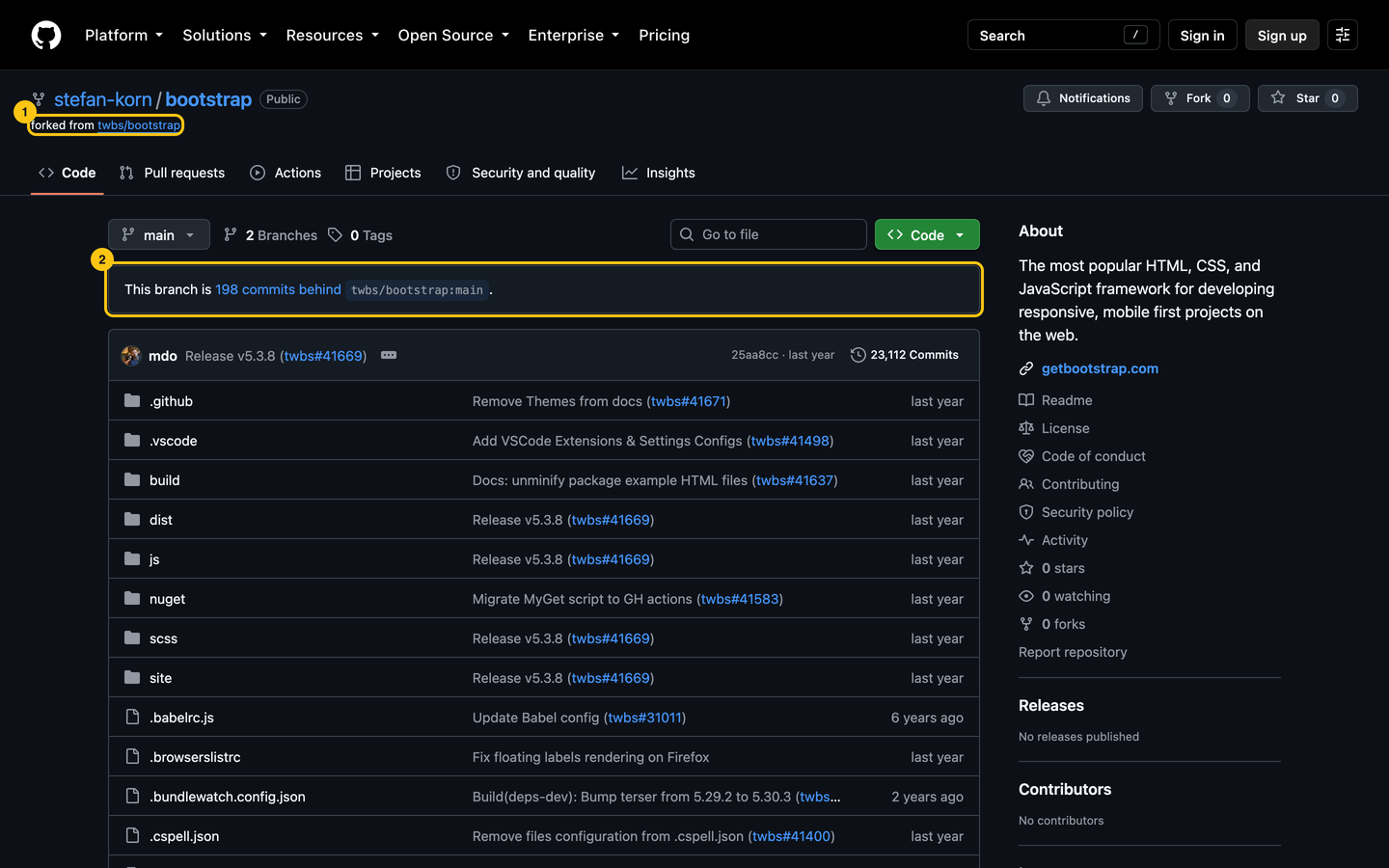
stefan-korn forked Bootstrap in August 2025 for their first contribution. The pull request was merged, and the fork (1) still sits on the v5.3.8 release: 198 commits behind the project (2), as of September 2026. Nothing’s wrong with that: a fork you don’t use doesn’t need syncing. It only matters when you start new work, and the fix is to start from upstream, not from your fork.
Set up once: who you are and how you sign in#
Git stamps every commit with a name and an email. GitHub links a commit to your profile only when the email is one of your account’s, so use the private address from Settings > Emails (it looks like 12345678+you@users.noreply.github.com) if you’d rather not publish yours:
git config --global user.name "Your Name"
git config --global user.email "12345678+you@users.noreply.github.com"
Then sign in. GitHub has refused account passwords for Git operations since August 2021. The shortest way in is the GitHub CLI:
gh auth loginIt asks for the protocol, HTTPS or SSH, and signs you in through the browser. With HTTPS, accept when it offers to authenticate Git: Git then uses the CLI’s token. With SSH, it finds your key or creates one and adds it to your account. Pick HTTPS if you have no preference; both end in the same place.
- Two-factor authentication: GitHub has required it from people who contribute code since March 2023. Turn it on before GitHub asks.
- Signed commits: optional, unless the project’s
CONTRIBUTING.mdsays otherwise. They add a Verified badge next to your commits (GitHub’s docs).
Fork and clone in one command#
With the GitHub CLI signed in, one command creates the fork, clones it and sets both remotes:
gh repo fork twbs/bootstrap --clone
cd bootstrap
git remote -v
origin https://github.com/<you>/bootstrap.git (fetch)
origin https://github.com/<you>/bootstrap.git (push)
upstream https://github.com/twbs/bootstrap.git (fetch)
upstream https://github.com/twbs/bootstrap.git (push)origin is your fork, upstream the project. If upstream is missing, add it with git remote add upstream https://github.com/twbs/bootstrap.git. The browser way (the Fork button, then git clone) is in Your First Contribution.
Start every branch from upstream/main#
Fetch the project’s latest commits, and branch from them directly:
git fetch upstream
git switch -c docs-viewport-wording upstream/main- Your fork’s
maindoesn’t need to be up to date: the branch starts from the project’s, whatever yours says. - One branch per change. Two fixes in one branch become one pull request, and the easy fix waits for the hard one.
- Name the branch after what it does. Some projects want a prefix (
fix/,docs/):CONTRIBUTING.mdsays.
To show what happens when you don’t, we started this chapter’s branch from v5.3.8, where stefan-korn’s fork still sits, and fixed “in mobile devices” in Bootstrap’s Introduction page.
Stage with git add -p, not git add .#
git add . stages everything you changed, including the note you left yourself. git add -p shows each change and asks. We had two: the fix, and a TODO comment further down.
git add -p@@ -14,7 +14,7 @@ Get started by including Bootstrap’s production-ready CSS and JavaScript via C
<br/>
-1. **Create a new `index.html` file in your project root.** Include the `<meta name="viewport">` tag as well for [proper responsive behavior](https://developer.mozilla.org/en-US/docs/Web/HTML/Viewport_meta_tag) in mobile devices.
+1. **Create a new `index.html` file in your project root.** Include the `<meta name="viewport">` tag as well for [proper responsive behavior](https://developer.mozilla.org/en-US/docs/Web/HTML/Viewport_meta_tag) on mobile devices.
```html
<!doctype html>
(1/2) Stage this hunk [y,n,q,a,d,k,K,j,J,g,/,e,p,P,?]? y
@@ -99,6 +99,8 @@ Curious which components explicitly require our JavaScript and Popper? If you’
- Toasts for displaying and dismissing
- Tooltips and popovers for displaying and positioning (also requires [Popper](https://popper.js.org/docs/v2/))
+<!-- TODO: same wording on the Vite page? -->
+
## Important globals
(2/2) Stage this hunk [y,n,q,a,d,K,J,g,/,e,p,P,?]? nFour answers cover most cases: y stages the change, n skips it, s splits it in smaller pieces, q stops. git status then lists the same file twice, once under “Changes to be committed” and once under “Changes not staged”. Commit the first:
git commit -m "Docs: say on mobile devices, not in mobile devices"[docs-viewport-wording 7d6630c84] Docs: say on mobile devices, not in mobile devices
1 file changed, 1 insertion(+), 1 deletion(-)git restore <file> then throws away what’s left. It can’t be undone: use git stash if you might want it back. Your First Contribution covers the commit message.
A conflict is two edits to the same line, and you write the result#
While you work, the project moves on. Bring its new commits under yours with a rebase:
git fetch upstream
git rebase upstream/main
Our branch started a year back. In the meantime, twbs/bootstrap#41861 had changed the MDN link on the line we edited:
Auto-merging site/src/content/docs/getting-started/introduction.mdx
CONFLICT (content): Merge conflict in site/src/content/docs/getting-started/introduction.mdx
error: could not apply 7d6630c84... Docs: say on mobile devices, not in mobile devices
hint: Resolve all conflicts manually, mark them as resolved with
hint: "git add/rm <conflicted_files>", then run "git rebase --continue".
hint: You can instead skip this commit: run "git rebase --skip".
hint: To abort and get back to the state before "git rebase", run "git rebase --abort".
Git stops and writes both versions in the file, between markers:
<<<<<<< HEAD
1. **Create a new `index.html` file in your project root.** Include the `<meta name="viewport">` tag as well for [proper responsive behavior](https://developer.mozilla.org/en-US/docs/Web/HTML/Reference/Elements/meta/name/viewport) in mobile devices.
=======
1. **Create a new `index.html` file in your project root.** Include the `<meta name="viewport">` tag as well for [proper responsive behavior](https://developer.mozilla.org/en-US/docs/Web/HTML/Viewport_meta_tag) on mobile devices.
>>>>>>> 7d6630c84 (Docs: say on mobile devices, not in mobile devices)
During a rebase, HEAD is the project’s version and the bottom one is yours: the opposite of what the word suggests. Neither is right here. The result keeps their link and our word, so write that line, delete the three markers, and carry on:
git add site/src/content/docs/getting-started/introduction.mdx
git rebase --continue
Successfully rebased and updated refs/heads/docs-viewport-wording.If you’re lost halfway, git rebase --abort puts everything back as it was before the rebase. Editors help: VS Code shows Accept Current Change, Accept Incoming Change and Accept Both Changes above each conflict; during a rebase, current is the project’s.
Some projects prefer git merge upstream/main to a rebase, and GitHub’s Update branch button on a pull request merges too. A merge keeps your commits as they are and adds one on top; a rebase rewrites them on the new base. Follow CONTRIBUTING.md, and rebase when it says nothing.
After a rebase, push with --force-with-lease, never pull#
The rebase gave our commit a new hash (7d6630c84 became 9333aa777). The fork still has the old one, so a plain push is refused (output from our replay, with your fork’s URL in place of ours):
To https://github.com/<you>/bootstrap.git
 ! [rejected]            docs-viewport-wording -> docs-viewport-wording (non-fast-forward)
error: failed to push some refs to 'https://github.com/<you>/bootstrap.git'
hint: Updates were rejected because the tip of your current branch is behind
hint: its remote counterpart. If you want to integrate the remote changes,
hint: use 'git pull' before pushing again.
Don’t follow the hint. git pull would try to combine the fork’s old commit with your new one: depending on your settings, Git stops and asks how, or merges them and the pull request shows the change twice. Replace the fork’s branch instead:
git push --force-with-lease + 7d6630c84...9333aa777 docs-viewport-wording -> docs-viewport-wording (forced update)--force-with-lease refuses to overwrite commits you haven’t fetched, for example the fix a maintainer pushed to your branch with “Allow edits by maintainers”. Plain --force would delete them without a word.
Almost everything can be undone#
Git keeps every commit you made for at least 30 days, even the ones no branch points to anymore. What it can’t bring back is work you never committed.
| What happened | What to run |
|---|---|
| Staged the wrong file | git restore --staged <file> |
| Forgot a change in the last commit | git add <file>, then git commit --amend --no-edit |
| Typo in the last commit message | git commit --amend -m "The right message" |
Committed on main instead of a branch |
git switch -c <branch>, then git switch main and git reset --hard upstream/main |
| A rebase went wrong and it’s still running | git rebase --abort |
| A rebase went wrong and it’s finished | git reset --hard ORIG_HEAD, right after it |
| Anything else | git reflog lists where HEAD has been; git reset --hard <hash> goes back there |
--amendandresetrewrite commits: if the branch was already pushed, push again with--force-with-lease.reset --hardalso throws away uncommitted changes. Rungit statusfirst.
Skip the terminal when the change is small#
A typo doesn’t need a clone. GitHub has three ways around the terminal, all signed in:
| Tool | What it’s for |
|---|---|
| The pencil on a file page | One file, one fix. On a project you can’t push to, GitHub creates the fork and the branch, and ends on the pull request form. |
| github.dev | Press . on any repository page: VS Code in the browser, for changes across several files. No terminal, so you can’t run the project. |
| Codespaces | A full machine with a terminal, in the browser. Free accounts get 120 core hours a month, 60 hours on the smallest machine (as of September 2026). |
| GitHub Desktop | An app for everything in this chapter, with buttons. Tick lines in the diff to stage them, the same as git add -p. |
Once you run the project to test a change, and you should, you need a clone or a codespace.
The whole flow, in one block#
# Once per machine
git config --global user.name "Your Name"
git config --global user.email "12345678+you@users.noreply.github.com"
gh auth login

# Once per project
gh repo fork <owner>/<repo> --clone

# Once per change
git fetch upstream
git switch -c <what-it-does> upstream/main
git add -p
git commit -m "<what the commit does>"
git push -u origin <what-it-does>

# When the project moves on
git fetch upstream
git rebase upstream/main
git push --force-with-lease
Do this now#
- Set
user.nameanduser.emailwith your GitHub no-reply address, then check them withgit config --global --list. - Turn on two-factor authentication on GitHub, if it isn’t on yet.
- Install the GitHub CLI and run
gh auth login. - Fork and clone a project you use with
gh repo fork <owner>/<repo> --clone, and check thatgit remote -vlistsoriginandupstream. - Make a branch from
upstream/main, change two lines, and stage only one withgit add -p.
Go further#
- Your First Contribution, Step by Step: these commands on a real pull request, from the issue to the merge.
- Pro Git, chapters 2 and 3: free, and the reference for everything this chapter skips.
- Dangit, Git!?!: more ways out of the mistakes in the table above, in plain words.
- GitHub CLI manual:
gh pr create,gh pr checkoutandgh repo syncsave you more trips to the browser.