The Files That Turn a Repository Into a Project
A repository is a folder with a contract, and the contract is a handful of files most people copy from somewhere without reading. Each one answers a question a stranger would otherwise ask you in an issue. Here’s what each file is for, the smallest version that works, and where GitHub shows it.
GitHub reads the files and shows them to everyone#
GitHub looks for these files by name, in .github/, then at the root, then in docs/, and links what it finds. The About box of chalk, a terminal color library with 42 million dependents on GitHub as of September 2026, lists five of them:
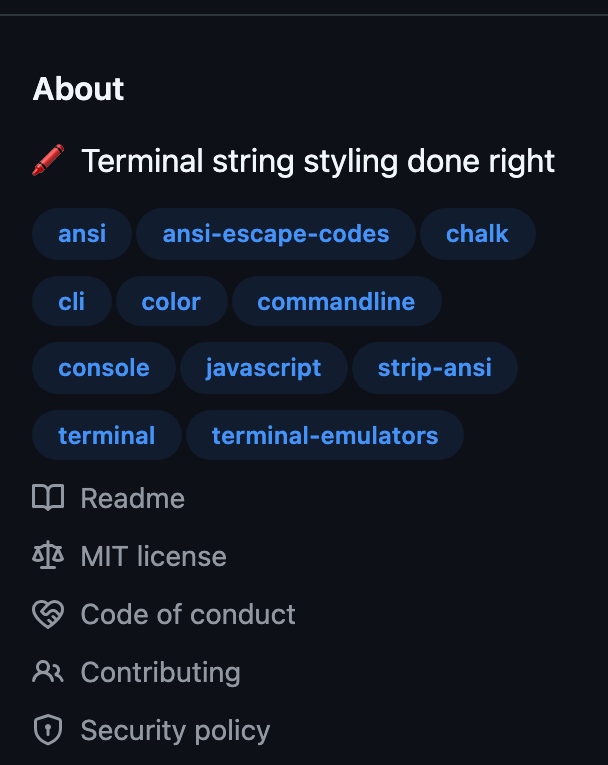
The names aren’t case-sensitive. Chalk’s files are readme.md, license, code-of-conduct.md, contributing.md and .github/security.md, and GitHub finds them all. Uppercase is a convention, not a requirement.
| File | Answers | Add it |
|---|---|---|
README.md |
What is this, and how do I use it? | Day one |
LICENSE |
Am I allowed to use it? | Day one |
CODE_OF_CONDUCT.md |
How do people treat each other here? | Before you share |
CONTRIBUTING.md |
How do I send a change? | Before you share |
SECURITY.md |
Where do I report a vulnerability? | Before you share |
.github/ISSUE_TEMPLATE |
What do you need in a bug report? | First issues |
.github/FUNDING.yml |
Can I pay you? | When you want it |
CHANGELOG.md |
What changed, and will it break my code? | First release |
CODEOWNERS |
Who reviews what? | Second maintainer |
The files work on any forge. Where GitLab and Codeberg look for them is further down.
The README sells the project on one screen#
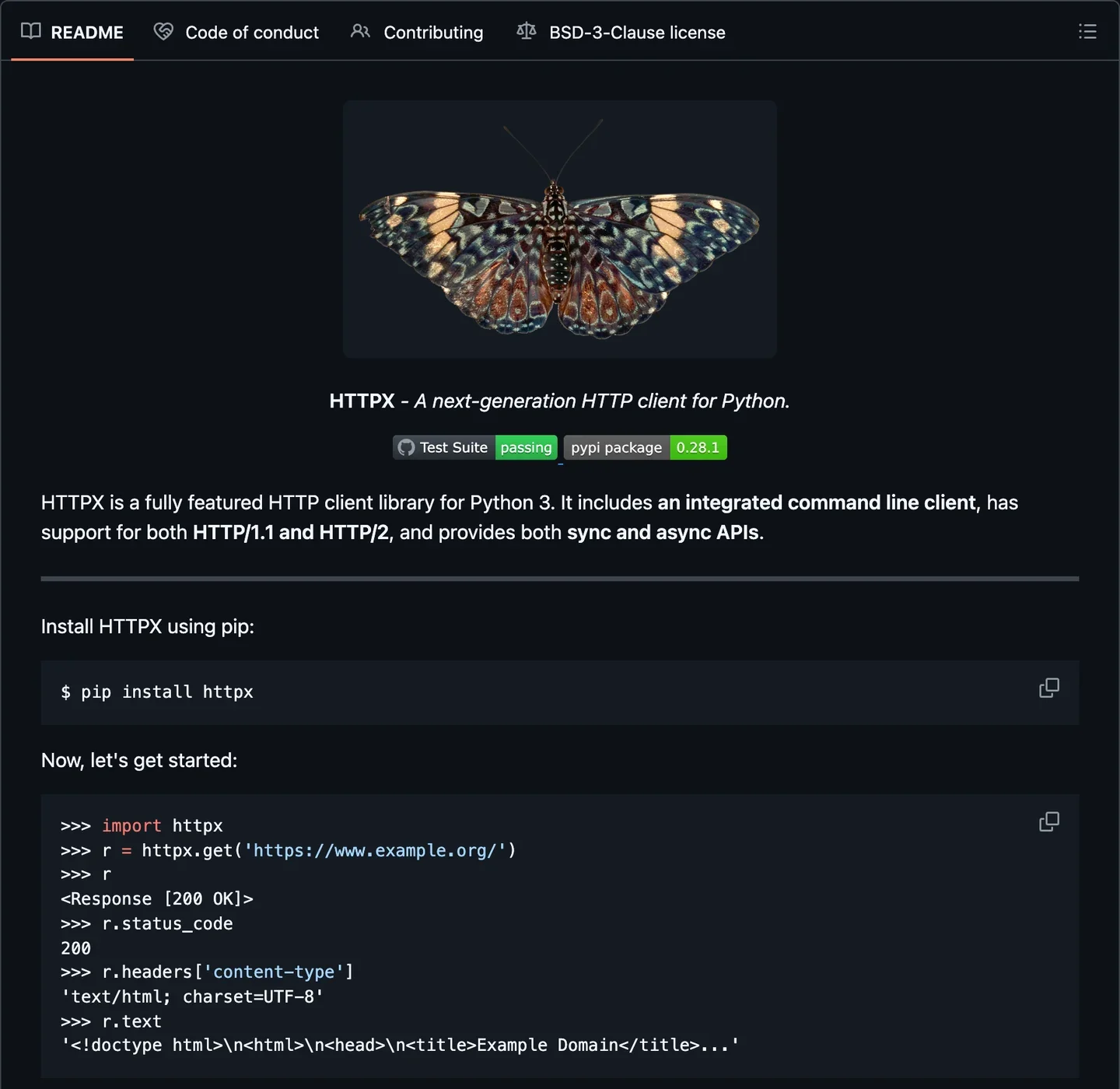
A visitor decides in one screen whether to keep reading, so that screen says what the project does and how to start. The first screen of HTTPX, an HTTP client for Python, has all of it: a logo, a one-line pitch, two badges, what it supports, the install command and a first request with its output:
The order that works for most projects:
- The name and one sentence on what it does, in words a newcomer searches for.
- What it looks like: a screenshot, a GIF of the terminal, or the output of the example.
- Install: one command per package manager you support.
- Usage in 30 seconds: the smallest example that does something real.
- Links: the docs, how to contribute, the license.
Two or three badges are enough. HTTPX’s say whether the tests pass and which version is out; downloads, stars and “PRs welcome” add nothing a reader needs to decide.
A README that passes the one-screen test:
# Project name
One sentence: what it does and for whom.
[](https://github.com/YOUR_ORG/YOUR_REPO/actions/workflows/ci.yml)
[](LICENSE)

## Install
```sh
# the one command that installs it
```
## Usage
```sh
# the smallest example that does something useful
```
Expected output:
```text
what the reader should see
```
## Documentation
Link to the docs, or to `docs/` if they live in the repository.
## Contributing
Issues and pull requests are welcome. Read [CONTRIBUTING.md](CONTRIBUTING.md) first.
## License
[MIT](LICENSE)The common mistake: a README that starts with the history of the project. Why you built it can go in a section further down, or in a blog post. A “Non-goals” section, on the other hand, saves you replies: Saying No explains why. The reader’s side of all this is in Reading a Repository in Five Minutes.
LICENSE goes in the repository, not only in the manifest#
Without a LICENSE file, nobody has the right to use your code, whatever the README says. Put the full text at the root, and the SPDX identifier in your manifest (package.json, pyproject.toml, Cargo.toml). Choosing a License covers which one and where it goes.
It’s the one file the .github repository trick, further down, can’t provide: GitHub requires it in each repository, so that it ships with every clone and every package.
A code of conduct names who to write to#
A code of conduct is only as good as its contact line. Most projects adopt the Contributor Covenant, version 3.0 since 2025, and the template leaves a placeholder where the reporting address goes. A GitHub code search for [INSERT CONTACT METHOD], the placeholder of version 2, finds 4,608 files named CODE_OF_CONDUCT.md, as of September 28, 2026: rules nobody can enforce, because nobody can report a breach.
Use an address more than one person reads, and turn on Settings › Moderation options › Reported content, so contributors can flag a comment to you without leaving GitHub. How to Create a Code of Conduct compares the templates.
CONTRIBUTING.md is for the reply you’d otherwise retype#
Most people won’t read it, and that’s fine: it’s the link you paste when a pull request skips the rules. GitHub links it when someone opens an issue or a pull request, and that’s as close as it gets to being read first.
Chalk’s contributing.md is one sentence pointing to the code of conduct. That’s a start. What saves you the most replies:
# Contributing

Thanks for taking the time. This page is the short version of how to send a change.

## Before you start

- For a bug, search the [open issues](../../issues) first. If it's new, open one with the steps to reproduce.
- For a feature or a larger change, open an issue and wait for a reply before writing code. It saves you a rejected pull request.
- Small fixes (a typo, a broken link) can go straight to a pull request.

## Set up

```sh
git clone https://github.com/YOUR_ORG/YOUR_REPO.git
cd YOUR_REPO
# install the dependencies
# run the tests
```

## Send a pull request

1. Fork the repository and create a branch from `main`.
2. Make the change. Add or update a test when behavior changes.
3. Run the tests and the linter locally.
4. Open the pull request and fill in the template.

We squash-merge, so the pull request title becomes the commit message. Write it like `fix(parser): handle empty input`.

## Review

A maintainer replies within a week. If nothing has happened after that, comment on the pull request once.

## Questions

Ask in [Discussions](../../discussions), not in issues.

## Code of conduct

Everyone taking part follows the [code of conduct](CODE_OF_CONDUCT.md).The common mistake: setup steps nobody has run since they were written. Clone the repository into a new folder once a year and follow your own guide to the letter. Two more lines belong here when they apply: how you handle AI-assisted contributions (a policy you can copy), and what contributors agree to when they send code (CLA or DCO).
SECURITY.md is one link and a promise you can keep#
A SECURITY.md sends vulnerability reports to a private channel instead of a public issue. Chalk’s is two lines: a link to the private reporting form, and “No AI slop will be accepted”. Yours needs the versions you fix, where to report and how fast you’ll answer. Security for Maintainers has the settings that go with it.
# Security policy

## Supported versions

| Version | Supported                 |
| ------- | ------------------------- |
| 2.x     | Yes                       |
| 1.x     | Security fixes until DATE |
| < 1.0   | No                        |

## Report a vulnerability

Please don't open a public issue.

Use [private vulnerability reporting](https://github.com/YOUR_ORG/YOUR_REPO/security/advisories/new), or write to security@example.org.

Include the affected version, the steps to reproduce, and what an attacker gains.

## What to expect

- We acknowledge your report within 3 working days.
- We send a first assessment within 10 working days.
- We agree on a disclosure date with you. The default is 90 days after the report, sooner once a fix is released.
- We credit you in the advisory unless you ask us not to.Issue forms ask the questions before you have to#
An issue form asks for what your first reply would have asked: the version, the steps, what happened. It’s a YAML file in .github/ISSUE_TEMPLATE/, and GitHub turns it into a form with required fields. A bug form that works:
name: Bug report
description: Something doesn't work as documented.
labels: ['bug', 'needs triage']
body:
  - type: markdown
    attributes:
      value: |
        Thanks for the report. Search the [open issues](../issues) first: yours may already be there.
  - type: input
    id: version
    attributes:
      label: Version
      description: Output of `project --version`.
      placeholder: 2.4.1
    validations:
      required: true
  - type: textarea
    id: expected
    attributes:
      label: What did you expect to happen?
    validations:
      required: true
  - type: textarea
    id: actual
    attributes:
      label: What happened instead?
      description: Paste the error message or the output.
      render: shell
    validations:
      required: true
  - type: textarea
    id: reproduce
    attributes:
      label: Steps to reproduce
      description: The smallest set of steps, or a link to a repository that reproduces it.
      placeholder: |
        1. Run `…`
        2. …
    validations:
      required: true
  - type: textarea
    id: environment
    attributes:
      label: Environment
description: Operating system, runtime version, anything that might matter.A config.yml next to it turns off blank issues and sends questions and vulnerabilities where they belong:
blank_issues_enabled: false
contact_links:
  - name: Question or idea
    url: https://github.com/YOUR_ORG/YOUR_REPO/discussions
    about: Ask questions and share ideas in Discussions, not in issues.
  - name: Security vulnerability
    url: https://github.com/YOUR_ORG/YOUR_REPO/security/advisories/new
about: Report vulnerabilities privately. Don't open a public issue.A pull request template is a Markdown file, .github/pull_request_template.md, pasted into every new pull request:
## What changes, and why

<!-- One or two sentences. Link the issue: Closes #123 -->

## How to test

<!-- Commands to run, pages to open, what to look at. -->

## Checklist

- [ ] I read [CONTRIBUTING.md](../CONTRIBUTING.md)
- [ ] Tests added or updated
- [ ] Docs updated
- [ ] Breaking change (describe the migration above)The common mistake: fifteen required fields. People fill them with “N/A” or leave for a project that asks less. Three questions get a better report than fifteen. The contributor’s side is How to Write a Bug Report That Gets Fixed.
FUNDING.yml turns on the Sponsor button#
Four lines in .github/FUNDING.yml add a Sponsor button to the repository and a list of where the money goes. Chalk’s file:
github: [sindresorhus, Qix-]
open_collective: sindresorhus
tidelift: npm/chalk
custom: https://sindresorhus.com/donate
GitHub renders it in the sidebar, one line per key:
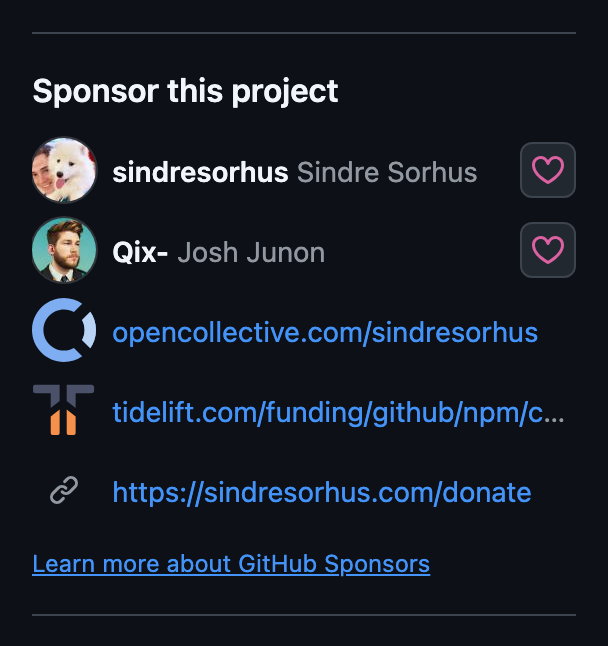
GitHub Sponsors takes up to four people or one organization; Open Collective, Liberapay, Ko-fi, Polar, thanks.dev and a few others take one account each, and custom takes up to four links (GitHub’s docs). Package managers have their own field for the same links: Add Funding Links to Your package.json.
A changelog is written for the people upgrading#
A changelog says what changed for the people who use the project, not for the people who wrote it. A dump of the git log fails that test: “Merge branch ‘main’” tells nobody whether their code breaks. Keep a Changelog is the format most hand-written ones follow, newest version first, with an Unreleased section on top:
# Changelog

All notable changes to this project are documented here. The format follows [Keep a Changelog](https://keepachangelog.com/), and the project follows [Semantic Versioning](https://semver.org/).

## [Unreleased]

### Added

- A new thing.

## [1.0.0] - YYYY-MM-DD

### Added

- First public release.

[Unreleased]: https://github.com/YOUR_ORG/YOUR_REPO/compare/v1.0.0...HEAD
[1.0.0]: https://github.com/YOUR_ORG/YOUR_REPO/releases/tag/v1.0.0If you publish GitHub Releases with generated notes instead, keep a CHANGELOG.md anyway, one line long, pointing to the releases page: it’s the first place people look.
Small config files end the small arguments#
A few files settle, once, what would otherwise come back in review.
-
CODEOWNERS, in.github/, the root ordocs/, requests reviews from the right people automatically. The last matching line wins, so the catch-all goes first:# The last matching pattern wins. Owners are asked to review pull requests that touch these paths. # Default owners for everything * @YOUR_ORG/maintainers # Documentation /docs/ @YOUR_DOCS_OWNER # CI and release automation /.github/ @YOUR_ORG/maintainersTurn on Require review from Code Owners in a branch rule to make one of their approvals mandatory.
-
.editorconfigsets indentation, line endings and the final newline for every editor that supports it. -
.gitattributeswith* text=auto eol=lfstops Windows line endings from turning a one-line change into a whole-file diff. -
A version file pins the toolchain:
.nvmrc,.python-version,rust-toolchain.toml, or.tool-versionsfor asdf and mise.
GitLab and Codeberg read the same files, from their own folders#
README, LICENSE, CONTRIBUTING, SECURITY and CHANGELOG are plain files: they work on every forge as they are. What changes from one forge to the next is where the templates and CODEOWNERS live, and what the forge does with them:
| File | GitLab | Codeberg (Forgejo) |
|---|---|---|
| Issue templates | .gitlab/issue_templates/*.md, Markdown only, no forms |
issue_template/ in .forgejo/, .gitea/ or .github/, with the same YAML forms and config.yml |
| Pull request template | .gitlab/merge_request_templates/*.md |
pull_request_template.md in the same folders |
CODEOWNERS |
Root, docs/ or .gitlab/, on the Premium and Ultimate tiers |
Root, docs/ or .forgejo/, with regular expressions (src/.* @alice), not glob patterns |
FUNDING.yml |
No equivalent | No equivalent |
Forgejo also reads .github/, GitLab doesn’t. A project that moves from GitHub to Codeberg keeps its issue forms without a change; one that moves to GitLab rewrites each form as a Markdown template in .gitlab/. Source Code Hosting Platforms compares the forges themselves.
One .github repository sets the defaults for all the others#
A public repository named .github in your account or organization provides these files to every repository that has none of its own. It works for CODE_OF_CONDUCT.md, CONTRIBUTING.md, SECURITY.md, SUPPORT.md, FUNDING.yml, and issue and pull request templates (GitHub’s docs). Chalk’s organization keeps a single file in its .github repository, funding.yml, so every chalk repository gets a Sponsor button.
Two limits. A default file isn’t part of a clone or a download, so someone reading the code offline doesn’t see it. And it can’t be a license: that one lives in each repository.
GitHub’s checklist is a to-do list, not a grade#
/(owner)/(repo)/community lists the files GitHub expects and ticks the ones it found. Chalk, with every file a contributor needs, still has three open items:
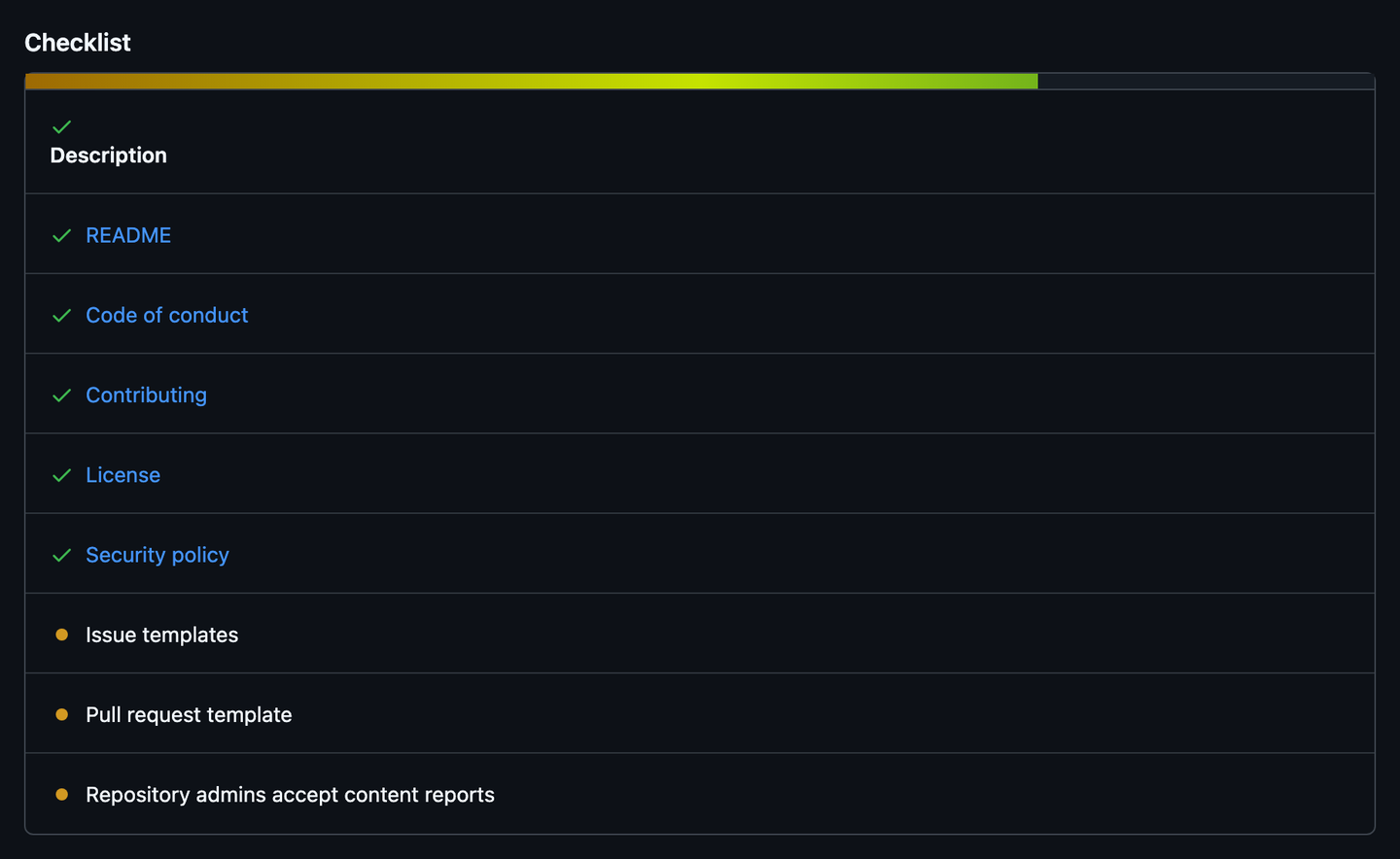
A library with a narrow scope and two maintainers can live without issue templates. Your project may too. Open the page for yours, and decide item by item.
Do this now#
- Open
/(owner)/(repo)/communityon your repository, and list what’s missing. - Read your README’s first screen as a stranger: does it say what the project does and show it?
- Search your code of conduct for a placeholder, and put a real address in it.
- Clone your repository into a new folder and follow
CONTRIBUTING.mdto the letter. Fix the first step that fails. - Add a
SECURITY.mdthat points to private vulnerability reporting. - Add one issue form, for bugs, with three required fields.
Go further#
- GitHub’s community health files: every file GitHub reads, and where it looks.
- Syntax for issue forms: every field type, from dropdowns to file uploads.
- Forge-specific repository folders, by Andrew Nesbitt: which folder GitHub, GitLab, Gitea, Forgejo and Bitbucket read, and the traps when a project lives on several.
- Keep a Changelog: the format, and the reasons behind each rule, on one page.
- Contributor Covenant 3.0: the code of conduct most projects start from.