Your First Contribution, Step by Step
This is one first contribution to Bootstrap, from the issue to the merge, with every screen you’ll see. It fixed one line of documentation and took ten days, most of them waiting for a review. We replayed the local steps on the same commit, so the commands and their output are real.
The spine of this chapter is twbs/bootstrap#41691, stefan-korn’s first pull request to Bootstrap. It had no review back-and-forth, so the review steps come from twbs/bootstrap#41143, Kelketek’s first one. Both were merged by Julien, who maintains Bootstrap and this guide.
| Step | #41691 (stefan-korn) | #41143 (Kelketek) |
|---|---|---|
| Pull request opened | August 27, 2025 | January 7, 2025 |
| First review | September 6, 2025 | January 12, 2025 |
| Merged | September 6, 2025 | April 8, 2025 |
| Change | 1 file, 1 line changed | 1 file, 2 lines added, 1 removed |
Start from an issue, yours or someone else’s#
stefan-korn was reading the Tables page of the Bootstrap docs and noticed the code example for colored tables left out the .table class. Before writing any code, they opened an issue with the project’s template: prerequisites checked (1), the problem in one sentence with a link to the page (2). The pull request that fixed it shows up in the issue’s sidebar (3).
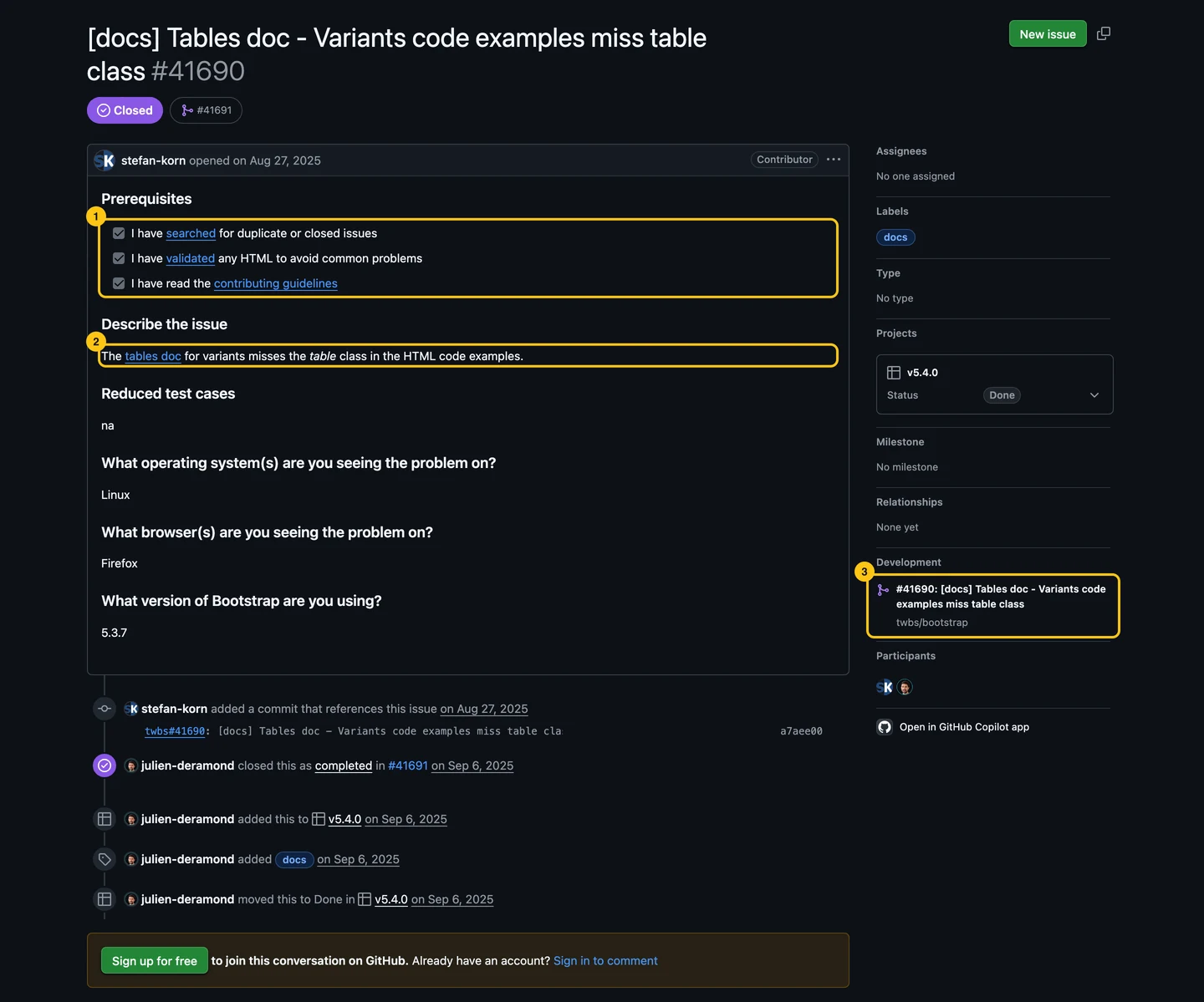
The issue does two things for you. It checks with the maintainers that the bug is a bug, and it gives your pull request something to close. If an issue already exists, read its comments before you start: someone may be on it, and the maintainers may have said how they want it fixed. Finding a Project to Contribute To covers how to pick one. How to Write a Bug Report That Gets Fixed covers opening one.
Read CONTRIBUTING.md before you touch the code#
Every project that wants contributions has a CONTRIBUTING.md, at the root or in .github/. Bootstrap’s says when to ask first and when to just send the pull request:
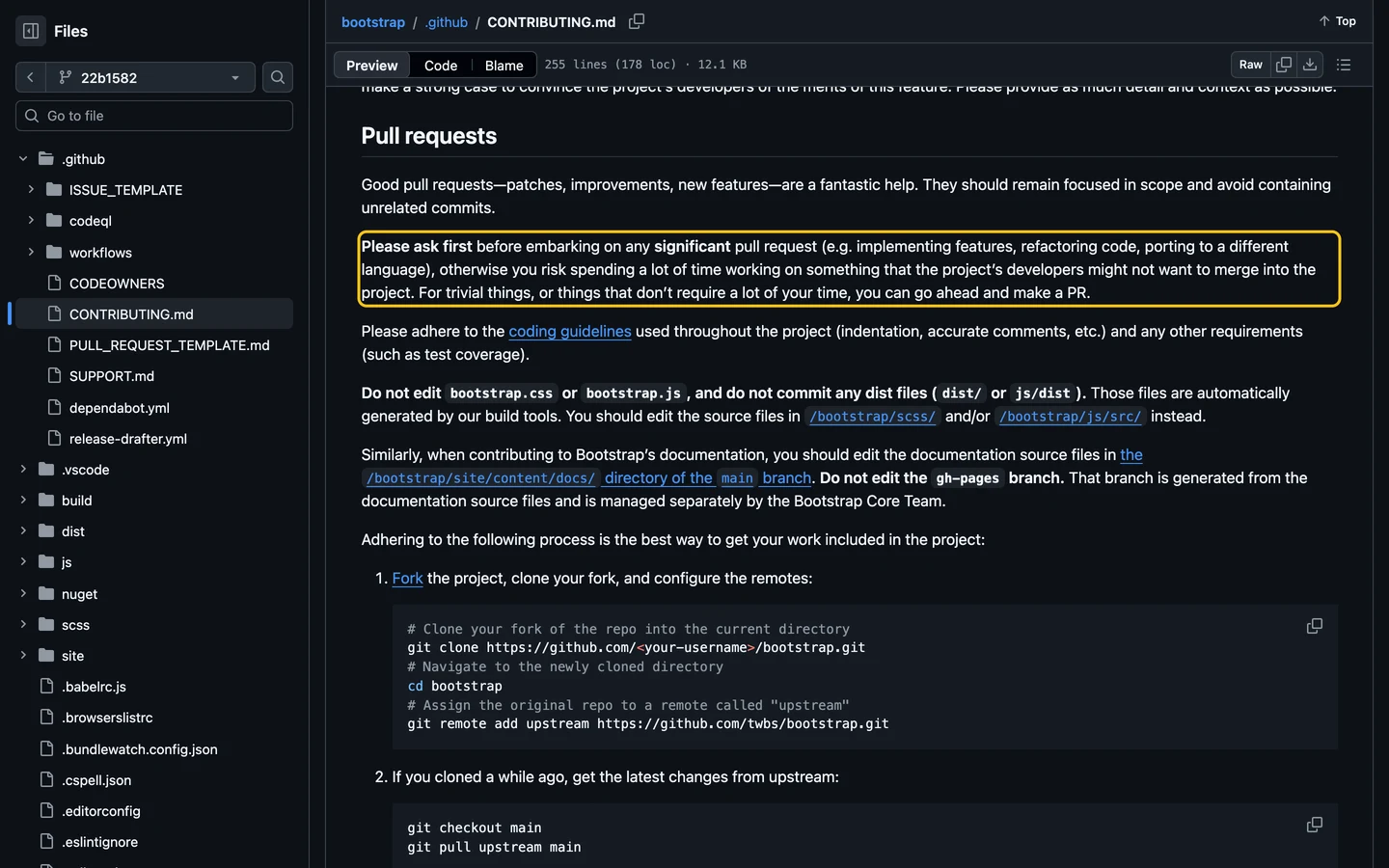
A one-line docs fix is a trivial thing: no need to ask. A new component is not. The same file lists the commands to run and the branch to target.
The guide can be out of date, so check it against the repository. Bootstrap’s CONTRIBUTING.md sends docs contributors to site/content/docs/, but the file stefan-korn edited lives in site/src/content/docs/ (as of September 2026). Search the repository for a sentence from the page you want to fix, and you’ll land on the right file.
Say you’re on it only if the project wants you to#
Some projects want a comment (“I’ll take this, here’s my plan”) before you start, and assign the issue. Others never assign, and the first good pull request wins. Bootstrap is in the second group, and stefan-korn opened the pull request the same day as the issue.
Look for the rule in CONTRIBUTING.md. If there’s none, a short comment with your plan costs nothing, but “Can I work on this?” with no plan doesn’t help anyone. Can I Take This Issue? explains both sides.
Fork, clone, branch: three commands and one button#
You can’t push to Bootstrap, so you push to your own copy of it: the fork. Click Fork at the top of the repository page, keep the defaults, then clone your fork and create a branch:
git clone https://github.com/<your-username>/bootstrap.git
cd bootstrap
git remote add upstream https://github.com/twbs/bootstrap.git
git switch -c docs-table-variants-classupstreampoints to the original repository, so you can pull its latest changes later.- The branch name says what it does. Never work on
main: you’ll need it clean to sync your fork. - Bootstrap’s full history is 226,404 objects and 328 MB (as of September 2026). The clone took two minutes on our connection.
The GitHub docs on forks show the Fork screen if you’ve never seen it. Git and GitHub Basics You Actually Need covers the setup before this step, and what to do when a command goes wrong.
Run the project before you change it#
Install the dependencies and start the documentation site, as the README says:
npm install
npm run docs-serve
On our machine, the install printed five EBADENGINE warnings, 13 deprecation warnings, and this:
npm warn EBADENGINE Unsupported engine {
npm warn EBADENGINE   package: '@jest/diff-sequences@30.0.1',
npm warn EBADENGINE   required: { node: '^18.14.0 || ^20.0.0 || ^22.0.0 || >=24.0.0' },
npm warn EBADENGINE   current: { node: 'v23.1.0', npm: '11.19.1' }
npm warn EBADENGINE }
added 1284 packages in 5s
npm warn install-scripts 3 packages have install scripts not yet covered by allowScripts:
npm warn install-scripts   esbuild@0.25.9 (postinstall: node install.js)
npm warn install-scripts   fsevents@2.3.3 (install: (install scripts present))
npm warn install-scripts   sharp@0.33.5 (install: node install/check)
None of this stopped the docs from starting on http://localhost:9001. Warnings aren’t errors. What matters is whether the command the README gives you works.
EBADENGINEmeans your Node.js version isn’t one the project supports. Node 23 is an odd-numbered release; use the version the project’s CI uses. Bootstrap’s docs workflow ran on Node 22 at the time; today it reads the version from.nvmrc(24.18.0, as of September 2026), and so can you withnvm use.- The
install-scriptswarning comes from recent npm versions, which don’t run a package’s install scripts until you approve them. If the project breaks because of it,npm install-scripts approve <package>lets the script run. - When the command itself fails, search the project’s issues for the error message before you open a new one. Someone has usually hit it before.
Make the smallest change that fixes the issue#
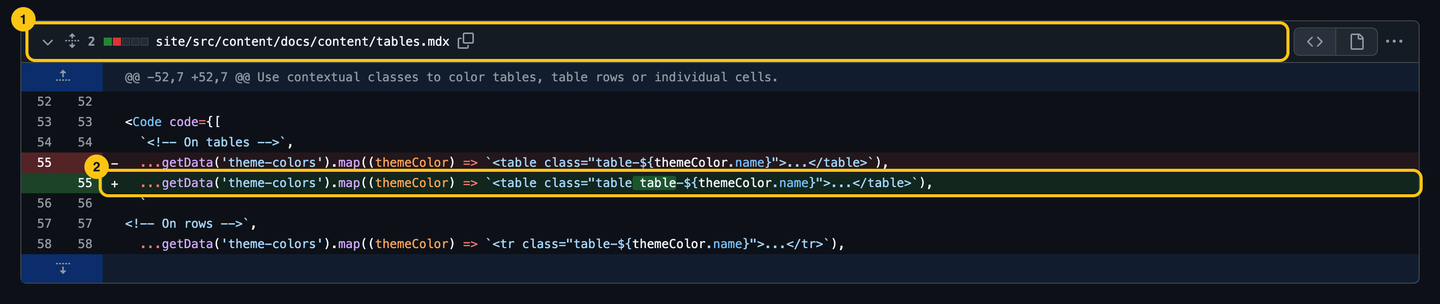
The fix was one line in site/src/content/docs/content/tables.mdx:
- ...getData('theme-colors').map((themeColor) => `<table class="table-${themeColor.name}">...</table>`),
+ ...getData('theme-colors').map((themeColor) => `<table class="table table-${themeColor.name}">...</table>`),
The docs server reloads, and the example on your machine now shows the class:
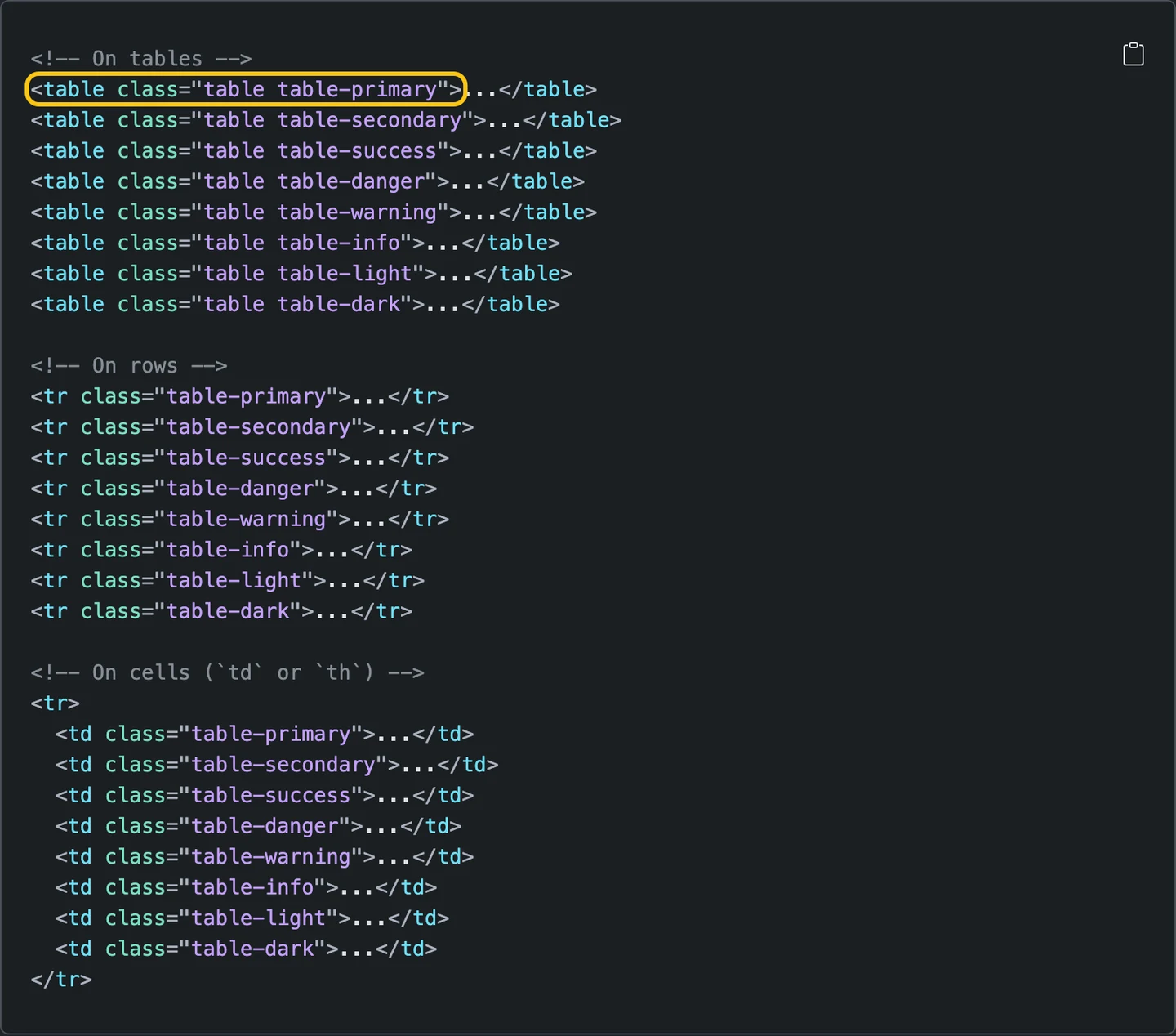
Don’t fix the typo two paragraphs down, and don’t reformat the file. Each extra change is one more thing the reviewer has to check, and a reason to wait. Open a second pull request for it.
Then run the checks CI will run. CONTRIBUTING.md says npm run test, which runs everything and takes a while. For a docs change, the checks that matter are formatting and spelling:
npx prettier --config site/.prettierrc.json -c site/src/content/docs/content/tables.mdx
npx cspell --config .cspell.json site/src/content/docs/content/tables.mdx
All matched files use Prettier code style!
CSpell: Files checked: 1, Issues found: 0 in 0 files.Write the commit message the maintainer would have written#
stefan-korn’s commit was twbs#41690: [docs] Tables doc - Variants code examples miss table class: the issue’s title. It describes the bug, not the change. When Julien merged, he squashed the commits and rewrote the message:
Docs: Add `.table` class to color tables example (#41691)Write that one yourself. Say what the commit does, in the imperative, with the area first if the project uses a prefix (git log --oneline shows the habit). Put the issue reference in the body:
git commit -m "Docs: add the .table class to the table variants example" -m "Fixes #41690"Push, then fill in every section of the pull request template#
git push -u origin docs-table-variants-classGitHub prints a link to open the pull request; the repository page shows a Compare & pull request button too. Bootstrap’s template asks for a description, the motivation, the type of change and a checklist. stefan-korn linked the issue (1) and ticked only what they had done (2):
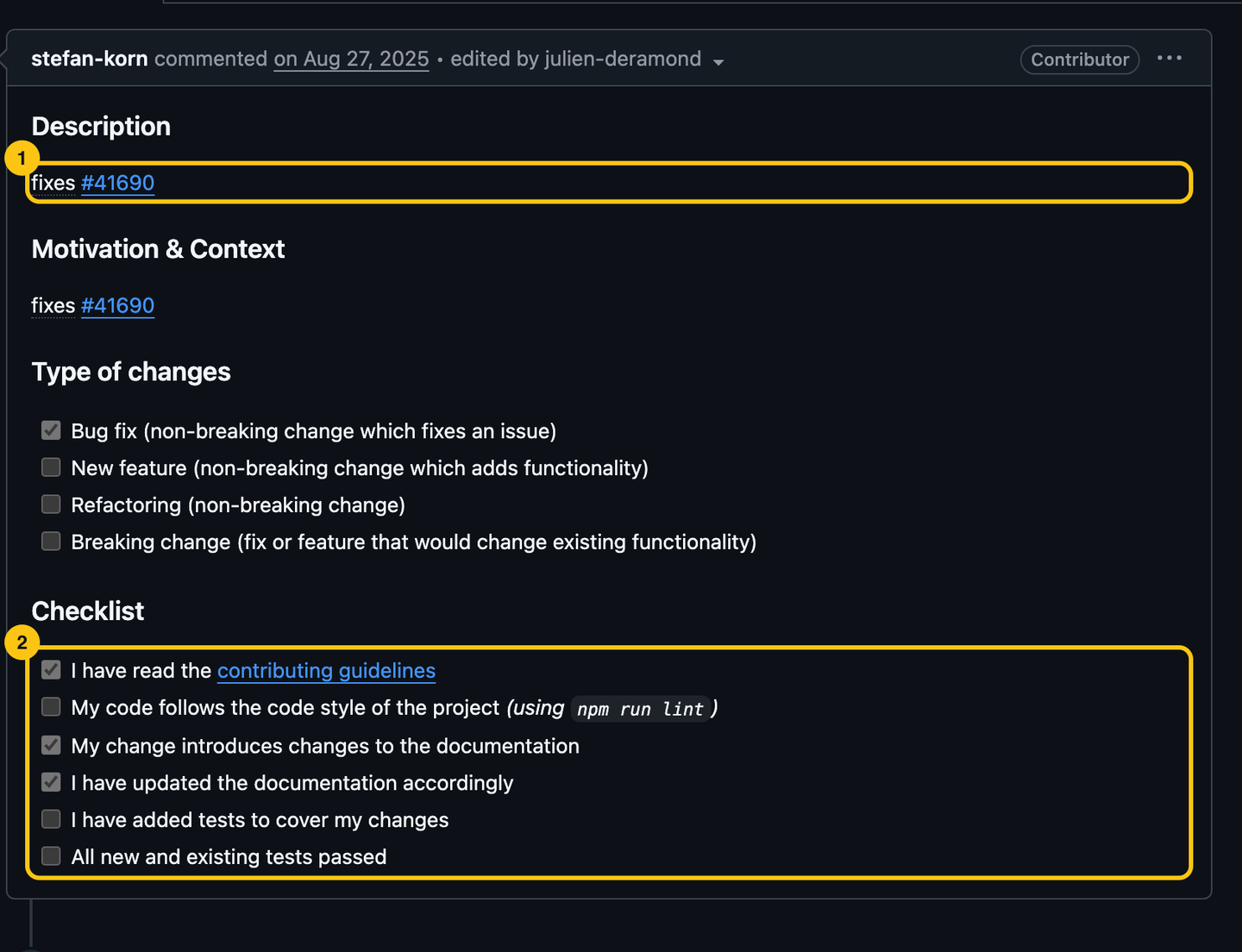
fixes #41690 in the description closes the issue when the pull request merges. The Files changed tab shows what the reviewer will read: one file (1), one line (2).
A red check is a to-do list, not a verdict#
Once the pull request is open, CI runs the project’s checks on it. #41691 passed all 14 on the first try. Yours might not, so we made it fail on purpose: one typo in the first sentence of the Variants section, then the spell check Bootstrap’s CI runs.
site/src/content/docs/content/tables.mdx:19:55 - Unknown word (indivdual) fix: (individual)
CSpell: Files checked: 1, Issues found: 1 in 1 file.
On GitHub, the failed check shows up in the pull request with a red cross; Details opens the same output. It gives the file, the line, the column and the fix. Fix it on your branch, commit, push: the pull request updates and CI runs again. No need to open a new one, and no need to apologize.
If a check fails on something you didn’t touch, say so in a comment. Flaky tests and broken main branches happen, and maintainers would rather know.
Reply to every review comment, then let the maintainer resolve it#
Kelketek’s pull request clarified a comment in Bootstrap’s Sass docs. Five days later, mdo, Bootstrap’s co-creator, suggested a better wording, as a suggestion block:
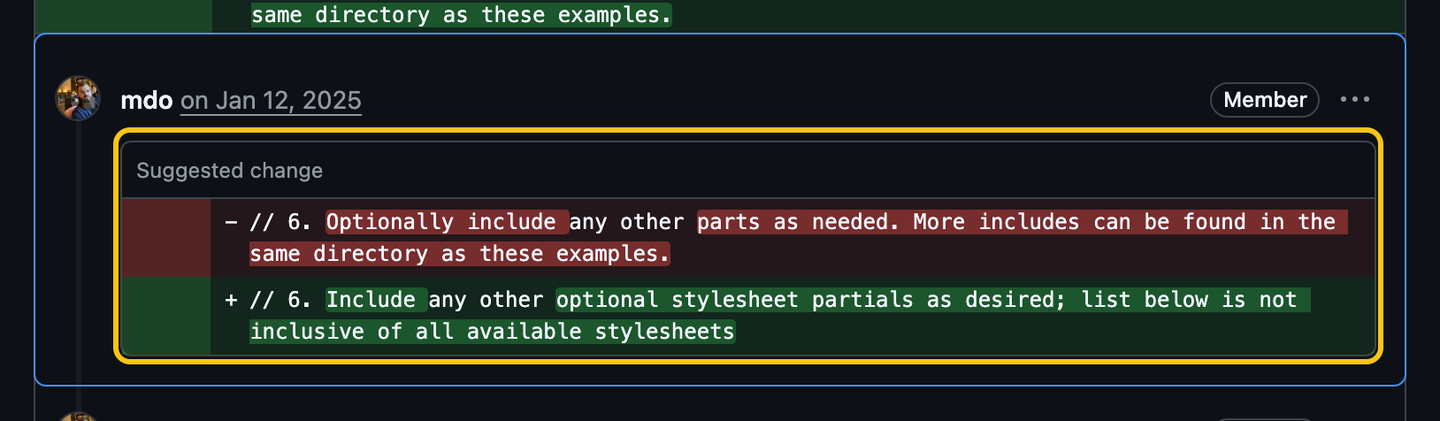
As the author, you see a Commit suggestion button under it: one click, and the change is a commit on your branch. mdo couldn’t apply it himself:

Leave “Allow edits by maintainers” ticked when you open the pull request. It lets maintainers push small fixes to your branch instead of asking you. Kelketek had opened the pull request from a fork owned by an organization, where the option doesn’t exist (GitHub’s docs): fork to your personal account for your contributions.
Kelketek applied the suggestion by hand the next day and said so: “I’ve squashed in your suggestion and re-pushed!”. Reply to every comment, even with “Done”, so the reviewer knows what to look at again. Many reviewers label their comments with Conventional Comments, or something close. Here’s what each label asks of you:
| Label | What it means | What the author does |
|---|---|---|
praise: |
Something done well. | Nothing. Keep doing it. |
nitpick: |
A detail of style or taste. Never blocks the merge. | Fix it or leave it, and say which. |
suggestion: |
A proposed change, often as a suggestion block. | Apply it, or explain why not and let the maintainer decide. |
question: |
The reviewer doesn’t understand something. | Answer it. Change the code only if the answer shows a problem. |
issue: |
A problem that has to be solved before the merge. | Fix it, or discuss it in the thread. |
(blocking) or (non-blocking) after the label settles the rest: suggestion (non-blocking): … can wait for another pull request.
After two weeks of silence, ask once#
Kelketek then waited. Nothing happened for 80 days, until this:

One line, no guilt, a question the maintainer can answer. Julien replied two days later, and the pull request was merged three days after that. Most projects are maintained on evenings and weekends: silence usually means nobody has had time, not that your work is unwanted.
- Wait two weeks before the first ping, less if
CONTRIBUTING.mdsays so. - Ask what’s missing rather than when it’ll be merged.
- Ping once. If nothing happens after that, move on to another issue: the pull request stays open, and someone may pick it up later.
Merged: clean up and sync your fork#
On #41691, the review was an approval and a sentence explaining the decision:
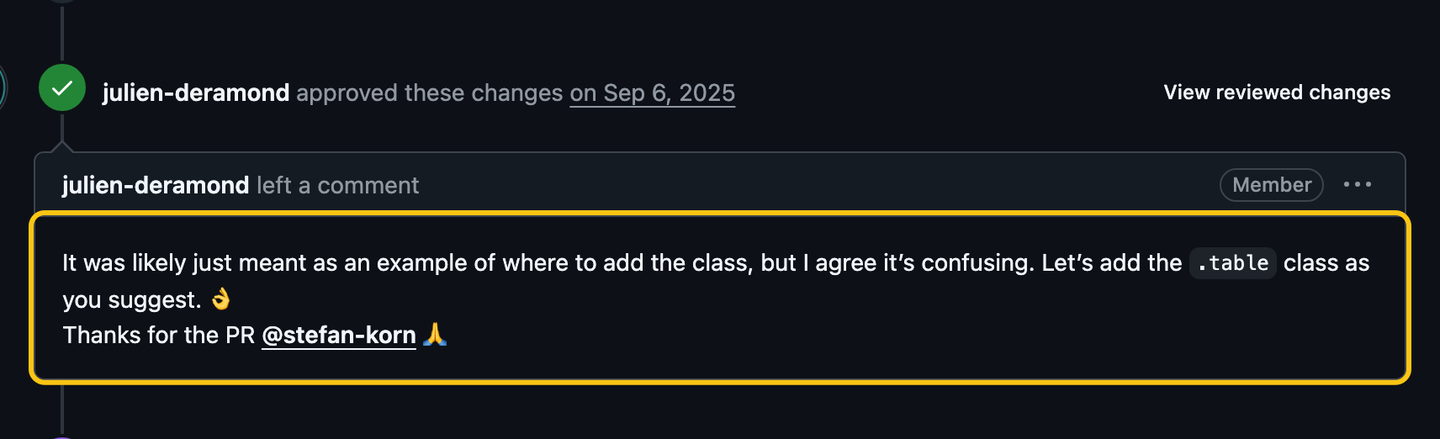
Then the merge, with the checks that ran on it:

The issue closed on its own, and stefan-korn’s comments in the repository now carry a Contributor badge. Clean up:
git switch main
git pull upstream main
git push origin main
git branch -D docs-table-variants-class
git branch -drefuses to delete a branch that was squashed, because its commits aren’t onmainunder the same hashes.-Dforces it: GitHub has the pull request.- Delete branch on the merged pull request removes the copy on your fork.
- Your next contribution starts from an up-to-date
main, with a new branch.
Do this now#
- Find the
CONTRIBUTING.mdof the project you want to contribute to, and read the section on pull requests. - Check which Node.js (or Python, or Go) version its CI uses, often in
.nvmrcor the workflow files, and install that one. - Clone it and run the command its README gives you, before you change anything.
- Before you push, run the checks CI will run: the workflows in
.github/workflows/list them. - Open your pull request from a fork on your personal account, with “Allow edits by maintainers” ticked.
- Put a reminder in your calendar two weeks after you open it.
Go further#
- twbs/bootstrap#41691 and #41143: the two pull requests in this chapter, to read in full.
- Reading a Repository in Five Minutes: check the project is alive before you spend an evening on it.
- Can I Take This Issue?: why some projects assign issues and others never do.
- About pull request reviews: every button a reviewer can press, from GitHub’s docs.