Finding Open-Source Software to Use
Search where your platform already installs software from, not the whole web. Then check what’s specific to using a project: whether its license allows what you’ll do with it, whether releases keep coming without known vulnerabilities, and what its security practices look like. The repository itself gets five more minutes, in the next chapter.
Looking for a project to contribute to rather than software to use? See Finding a Project to Contribute To.
The running example is Prettier, a code formatter: a tool you install from npm.
Search where the software is installed from#
Registries and stores list what you can actually install, with a version, a license and a download count. A web search lists what someone wrote about.
| You need | Look first in |
|---|---|
| A library | Your ecosystem’s registry: npm, PyPI, crates.io, Packagist, Maven Central |
| A command-line tool | Your package manager: Homebrew, apt, dnf, or the language registry |
| A desktop app on Linux | Flathub. It lists proprietary apps too: check the license on the app page |
| An Android app | F-Droid, which only lists free and open-source apps |
| A list of options by topic | Awesome lists and GitHub topics |
Two ecosystems can answer the same need: Prettier is on npm and on Homebrew. Install it from the one you already keep up to date.
The license question depends on what you’ll do with it#
Running an app or a tool: any license approved by the Open Source Initiative lets you use it for any purpose, at work included. The Open Source Definition forbids restricting fields of endeavor.
Shipping a library inside your code: the license travels with your project. Permissive licenses (MIT, Apache-2.0, BSD) ask you to keep the notice. Copyleft licenses (GPL, AGPL) can require you to publish your own code under the same terms when you distribute it, or, for the AGPL, when people use it over a network.
Read the license as an SPDX identifier on the registry page, not as a badge in the README. Open Source Insights shows it for every version, next to the known vulnerabilities and the packages that depend on it.
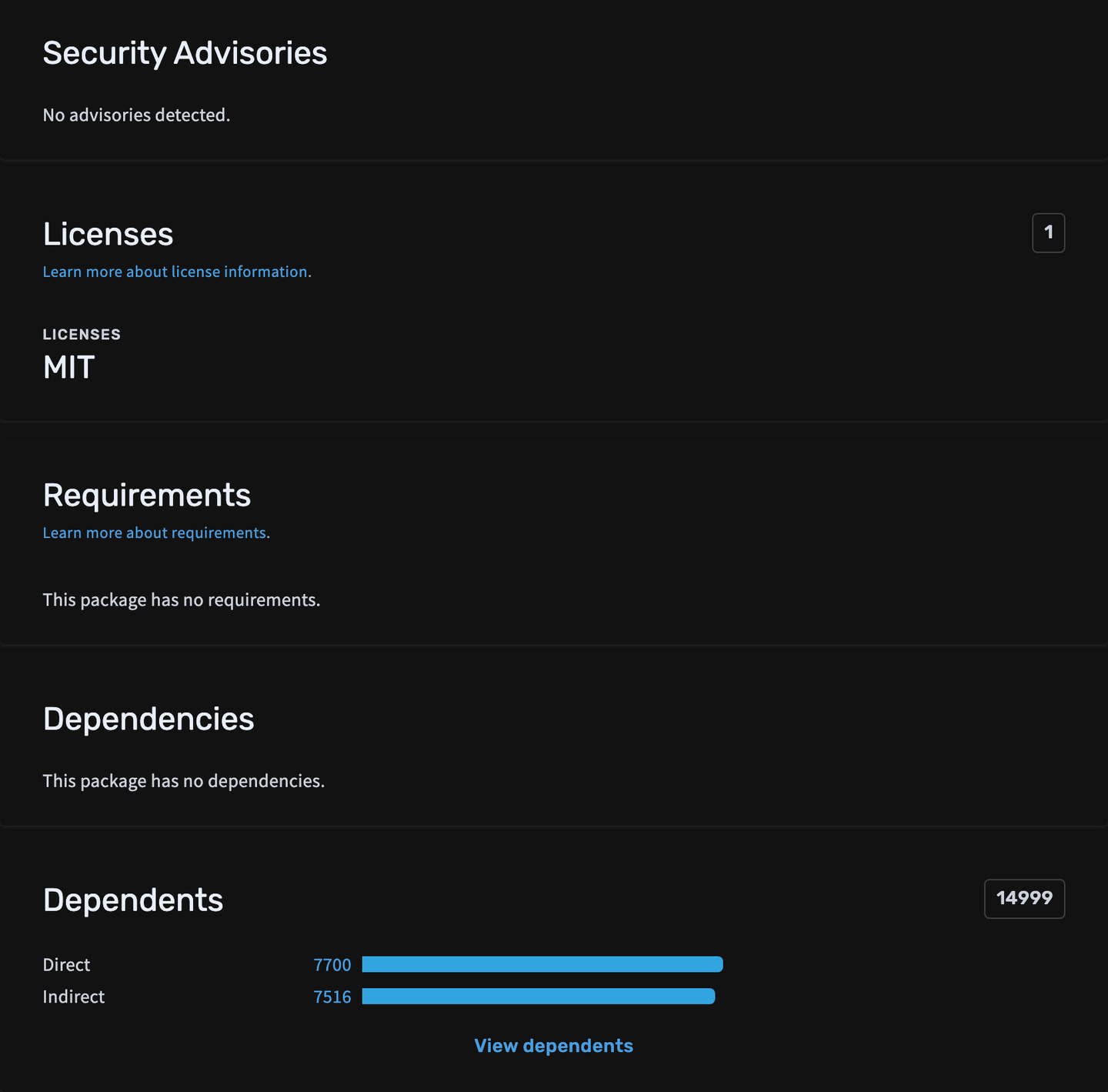
Prettier 3.9.9, published September 23, 2026: MIT, no known advisories, no dependencies of its own, and 154 million downloads on npm the week of September 19 (as of September 2026). A package with no dependencies brings one supply chain into your project, not dozens.
For an app, look at where the binaries come from: the project’s own release page, or a store that builds from the source, as F-Droid does.
The Scorecard grades practices: read the checks#
The OpenSSF Scorecard scans public repositories on a regular schedule and scores security practices from 0 to 10: code review, a security policy, pinned dependencies, signed releases, fuzzing. Open scorecard.dev/viewer/?uri=github.com/<owner>/<repo>, or find it on the project’s deps.dev page.
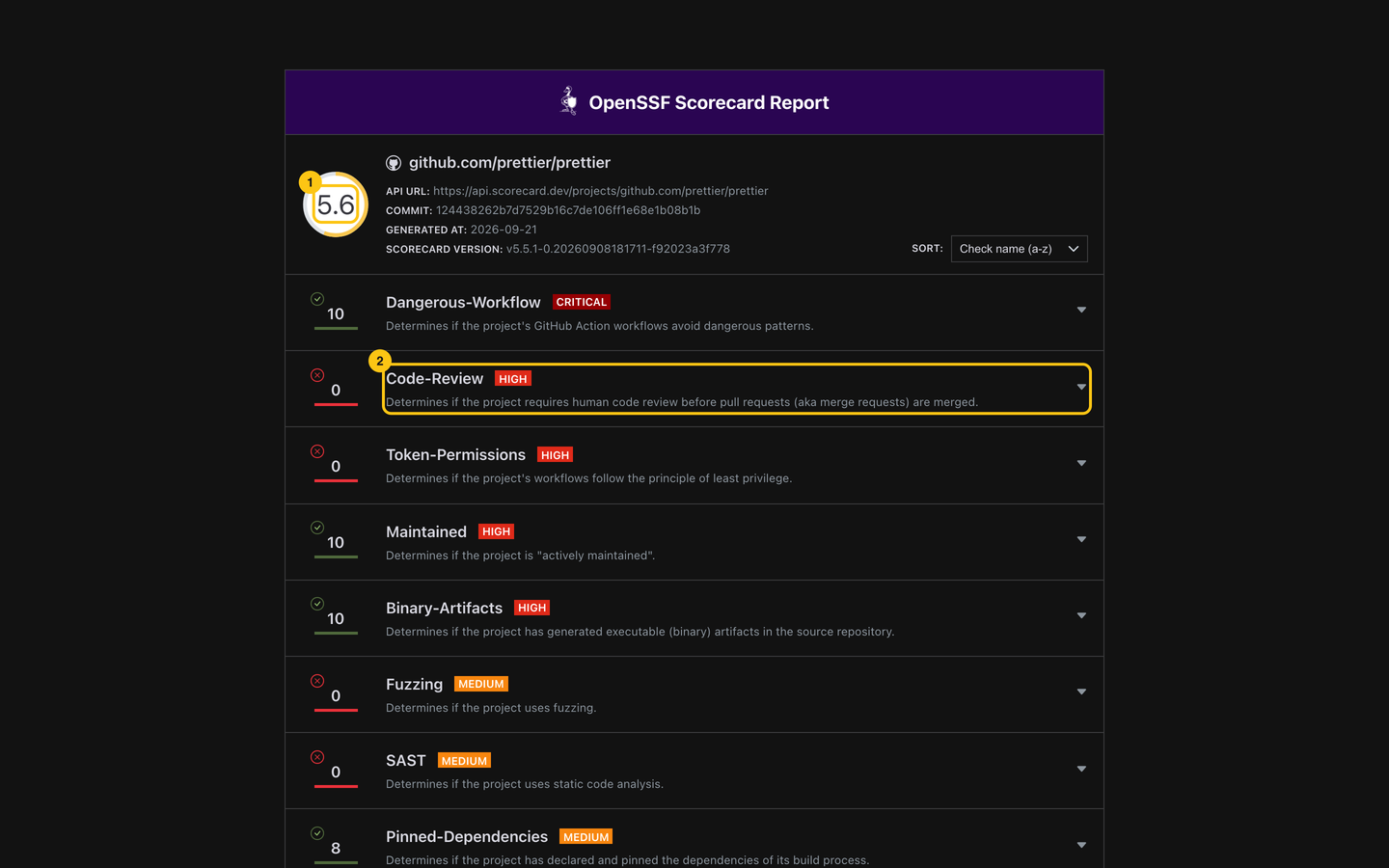
Prettier scores 5.6 (scan of September 21, 2026). The total (1) hides the story. Code-Review (2) is 0: in the recent changes Scorecard checked, it found no sign of a review by a second person before the merge. Maintained, Security-Policy and License are at 10. That’s a fact about how the team works, not a vulnerability.
Use the Scorecard to compare two candidates, and read the low checks that matter for your use. For a tool that runs in your CI, Token-Permissions and Pinned-Dependencies matter more than Fuzzing.
Three red flags#
- The repository is archived. GitHub shows a banner and the repository is read-only: nobody will fix the next bug.
- A single maintainer is asking for help. “Looking for maintainers” in the README or a pinned issue isn’t a reason to stay away. It’s a reason to plan for the day you have to replace the project.
- The license changed. Open the history of the
LICENSEfile. Terraform’s shows a commit on August 10, 2023 moving it from the MPL to the Business Source License, which isn’t open source. The community forked the last MPL version as OpenTofu.
Then read the repository#
The license and the releases say whether you may and should use a project. The repository says whether someone will still be there next year: the commit history, the health files, how issues are answered, the pull request queue, who writes the code. Reading a Repository in Five Minutes walks through each signal.
Do this now#
- Search the registry, package manager or store you install from before a web search.
- Read the license identifier and check it allows what you’ll do: run it, or ship it inside your code.
- Check the latest release date and the known advisories on the registry or on deps.dev.
- Open the Scorecard and read the checks at 0 that matter for how you’ll use the project.
- Look at the history of the
LICENSEfile for a license change. - Give the repository five minutes with Reading a Repository in Five Minutes.
Go further#
- Open Source Insights: license, versions, advisories and dependents of npm, PyPI, Maven, Go, Cargo and NuGet packages, one page per package.
- Scorecard checks: what each check measures and how it’s scored, to read a 0 correctly.
- The Open Source Definition: the ten criteria a license meets to be open source, and why “source-available” isn’t.
- Finding a Project to Contribute To: the same search, when you want to give back instead.